Category: Explainer Video

  • Explainer Video vs Product Demo: Which One Does Your Business Need?

    Explainer Video vs Product Demo: Which One Does Your Business Need?

    Two people walk onto your website. One has never heard of your category and wants to know why they should care. The other has already shortlisted you against two competitors and wants to know whether your integration will break their workflow.

    The same video cannot serve both. That’s the practical heart of the explainer video vs product demo question, and it’s why the debate keeps going in circles. Teams argue about which format is better when the real variable is which visitor they’re talking to.

    This piece defines both formats properly, shows where each one works, and gives you a way to decide without guessing.

    Key Takeaways

    • These are not competing versions of the same asset. They answer different questions for people at different stages.
    • An explainer creates understanding. A demo supplies proof. Neither substitutes for the other.
    • Most businesses that think they need one actually need the explainer first, then the demo.
    • The single biggest waste is a hybrid that tries to do both jobs and does neither.
    • Length, audience knowledge, and technical depth decide the format far more than budget does.
    • Explainer video vs product demo is the wrong framing once you pass roughly ten employees. By then you likely need both, built in sequence.

    The Two Formats Do Different Jobs, and the Confusion Costs Real Money

    Treat these as two tools rather than two styles, because the vocabulary has drifted badly. Plenty of vendors label a screen recording an explainer, and plenty of marketers call a two-minute animation a demo.

    That drift matters commercially. A team asks for an explainer, receives a nine-minute feature walkthrough, and can’t understand why nobody watches it. Another commissions a beautiful animation for a page full of evaluators who wanted to see the actual software.

    Video itself isn’t the risky part of this. HubSpot’s research consistently finds that video ranks among the most used and most preferred content formats in marketing. The risk is spending video budget on the wrong job.

    So before comparing them, it’s worth being precise about what each format actually is.

    What Separates an Explainer Video From a Product Demo? A visual representation of the difference between an explainer video and a product demo.

    An explainer video makes an unfamiliar idea understandable. A product demo proves a familiar promise is real. That single distinction drives every other difference between them.

    An explainer typically runs sixty to ninety seconds, uses animation or motion graphics, stays out of the interface, and speaks to someone who may not know your category exists. It sells the problem before the product.

    A demo runs anywhere from three to ten minutes, shows the real software doing real work, and speaks to someone who has already decided the problem is worth solving. It sells proof rather than possibility.

    Put simply, the difference between explainer video and product demo is the difference between “here is why this matters” and “here is it working.” One earns attention. The other earns confidence.

    The Explainer Sells the Problem, the Demo Sells the Proof

    Lead with whichever asset addresses your visitor’s current objection. The explainer removes confusion. The demo removes doubt. Those are different obstacles, and they appear at different moments.

    Confusion sounds like “I’m not sure what this does.” A viewer in that state needs context, a recognizable problem, and a clear outcome. Showing them a settings panel makes it worse.

    Doubt sounds like “I believe you, but will it work here?” That viewer has stopped needing persuasion and started needing evidence. Animation frustrates them, because animation can depict anything, including things the product cannot do.

    Because the explainer sits earlier, it tends to carry more measurable weight on landing pages and paid traffic. Our piece on explainer videos for increasing conversions covers where that effect is real and where it isn’t.

    Where Each One Sits in the Buying Journey Showing where each technology is better.

    Map each format to a stage rather than to a page, because coverage gaps are what actually hurt you. Framed this way, explainer video vs product demo becomes a question about coverage rather than preference. There’s a stretch in the middle where either could work, and that overlap is where most internal disagreements happen.

    An explainer covers the unaware and problem-aware stages well, still helps while someone is comparing options, and becomes almost useless once they’re deep in evaluation. A demo is the reverse. It’s wasted on a stranger and essential to a shortlisted buyer.

    This matters because B2B buyers move through several pieces of content before they ever speak to a salesperson. Research from Demand Gen Report has long shown that buyers consume multiple content assets during a single purchase decision, which means gaps in your coverage get filled by a competitor.

    Deciding between product demo vs explainer video for a single page is far less useful than auditing which stages currently have nothing.

    What an Explainer Video Cannot Do

    Don’t ask an explainer to close a technical evaluation. It will fail, and the failure looks like the video underperforming when the assignment was wrong.

    Four things sit outside its range:

    • It can’t answer configuration questions, because it never shows the configuration
    • It can’t satisfy a security or compliance reviewer who needs to see permissions
    • It can’t demonstrate that the product handles messy real-world data
    • It can’t replace hands-on time for a buyer who has already committed to evaluating you

    There’s also a credibility ceiling. Animation shows an idealized version of the product by definition. Sophisticated buyers know this, and past a certain point in their process, they discount anything that isn’t the real screen.

    What a Product Demo Cannot Do?

    Don’t put a demo in front of cold traffic. A demo assumes context the visitor doesn’t have yet, so it lands as noise.

    Demos are influential, which is exactly why teams overuse them. TrustRadius research into software buying has repeatedly found that product demos rank among the most influential resources for software buyers. That influence applies to buyers already in market, not to someone who arrived from a social post.

    Three specific limits are worth naming. A demo can’t establish why the problem matters, since it starts from the assumption that you agree it does. It can’t hold attention in a paid social feed, where ten minutes is unthinkable. And it dates quickly, because every interface change makes the footage slightly wrong.

    Good software demo videos also demand more from the viewer. That’s fine for an evaluator and fatal for a browser.

    Which One Should You Build First?

    Build the explainer first in almost every case. There’s a straightforward reason, and it holds for most companies below a few hundred customers.

    Traffic arrives at the top of the funnel in far greater volume than at the bottom. An asset serving the widest audience gets more use per dollar, and it feeds the demo by qualifying people before they request one.

    There’s a second argument that matters more than it sounds. Writing an explainer forces you to articulate your value in ninety seconds. Companies routinely discover during that process that their positioning was muddy, which is a cheaper thing to learn during scripting than during a sales call.

    The exception is a company selling exclusively into enterprise procurement with a small number of large deals. When every prospect already knows the category, choosing between an explainer video or product demo tilts toward the demo.

    Cases Where One Genuinely Replaces the Other

    A single asset can carry both loads in a few specific situations, so it’s worth knowing them before you commission two videos you don’t need.

    If your product is visually self-evident and your category is well understood, a short screen-recorded walkthrough can do the explainer’s job too. Project management tools often fall here. The interface explains the concept.

    If your category is genuinely new and there’s nothing to show yet, an explainer can stand in for a demo temporarily. Pre-launch companies do this out of necessity, and it works until buyers start asking to see the real thing.

    Gated video is the third case. A substantial explainer can act as a lead capture asset that replaces a demo request entirely for earlier-stage prospects, an approach we cover in explainer videos as lead magnets.

    Production Cost and Timeline Differ More Than People Expect

    Budget these differently, because their cost structures barely resemble each other. Assuming a demo is the cheap option is a common and expensive mistake.

    An explainer front-loads its cost into scripting, storyboarding, illustration, and animation. Timelines usually run four to eight weeks. The cost is largely fixed regardless of your product’s complexity.

    A demo front-loads its cost into your own team’s time. Someone has to build a clean environment with believable data, run the workflow without errors, and re-record after every interface update. The invoice can look smaller while the internal cost runs higher.

    Recording also creates an ongoing obligation that animation doesn’t. Software explainer video production is a project with an end date, while demo footage is closer to maintenance. Our breakdown of in-house vs. outsourced explainer video production cost covers where each model makes sense.

    Do You Actually Need Both?Understanding the depth of each technology for users.

    Past a certain size, yes. Once you have meaningful top-of-funnel traffic and a real evaluation process, the two assets stop being alternatives and start being a sequence.

    A workable minimum for most software companies is one explainer on the homepage and key landing pages, plus one demo behind a form or on a dedicated page for people who ask. That’s two assets, not a library, and it settles the explainer video vs product demo debate by refusing it.

    Sequencing beats volume here. The strongest software explainer videos are built to hand a viewer cleanly to a demo, which outperforms four disconnected films because each asset has a job and a next step.

    If you’re weighing a software explainer video company against building in-house, the question to ask is whether they think in sequences or in deliverables. Our software explainer video services are structured around that handoff rather than around individual films.

    The Mistake That Ruins Both Formats

    Avoid the hybrid. The most common failure isn’t picking wrong, it’s refusing to pick and producing something in the middle.

    It usually arrives as a three-minute video that opens with thirty seconds of animated problem framing, then cuts into a feature tour. Newcomers leave during the tour. Evaluators skip the animation and find the tour too shallow. The asset gets used everywhere and works nowhere.

    The cause is organizational rather than creative. Marketing wants an explainer, sales wants a demo, one budget exists, and the compromise satisfies the meeting instead of the viewer. Teams that argue product demo video vs explainer priorities in a planning session tend to split the difference and lose both.

    If you’re stuck with a single budget, build the shorter asset properly and let a salesperson handle the depth in a live call. A clean ninety-second film plus a human beats a muddled five-minute one.

    Final Words

    The explainer video vs product demo decision resolves the moment you stop asking which format is better and start asking what your visitor is currently trying to find out.

    If they’re asking why this matters, they need an explainer. If they’re asking whether it works here, they need a demo. If you don’t know which they’re asking, that’s the actual problem, and no video fixes it.

    For most companies, the practical answer is an explainer first, a demo second, and a clear path from one to the other. Explainer Video Company builds them in that order for exactly that reason. Whether you work with another animated explainer video production partner, choose one that asks about your funnel before it asks about your brand colors.

    Frequently Asked Questions

    What is the difference between an explainer video and a product demo?

    An explainer video makes an unfamiliar idea understandable, usually in sixty to ninety seconds using animation and staying out of the interface. A product demo shows the real software completing real tasks, usually over three to ten minutes, for someone already evaluating you. One creates understanding, the other supplies proof.

    Can an explainer video replace a product demo?

    Only in specific situations. It can work if your category is genuinely new and there’s nothing to show yet, or if you’re capturing earlier-stage leads who aren’t ready to evaluate. It cannot replace a demo for buyers with configuration, security, or integration questions, because those need the real interface.

    What type of video should I use for my product?

    Match the format to what your visitor is currently trying to find out. If they don’t yet understand why your product matters, use an explainer. If they understand and want evidence it works in their situation, use a demo. High-traffic marketing pages usually need the explainer.

    Should I make an explainer video or a product demo first?

    Start with the explainer in most cases. It serves a much larger audience, works across more pages, and qualifies people before they request a demo. Writing it also forces clarity about your positioning. Enterprise-only companies with few large deals are the main exception.

    What is the best video for a SaaS product?

    Most SaaS companies get the best return from a short explainer on their main pages plus one demo available on request. Software rarely explains itself from a screenshot, so the explainer earns attention while the demo closes the evaluation. Which matters more depends on where your traffic currently arrives.

    Is an explainer video better than a product demo?

    Neither is better. They answer different questions at different stages, so comparing their quality is like comparing a headline to a case study. The useful question is which one your funnel is missing right now, and that depends on where prospects are dropping off.

    Related Articles

  • Do Explainer Videos Actually Increase Conversion Rates?

    Do Explainer Videos Actually Increase Conversion Rates?

    Every agency pitch deck contains a slide claiming that video lifts conversions by some impressive percentage. The number changes depending on who is presenting. The source almost never appears.

    So it’s worth asking plainly whether explainer videos move conversion rates, and if they do, by how much and under what conditions. The answer is more useful than the marketing version, because it tells you when to spend money and when to keep it.

    This piece separates what the evidence supports from what gets repeated, then shows you how to find out for your own site.

    Key Takeaways

    • Yes, but the honest answer is smaller and more conditional than the figures usually quoted at you.
    • Most eye-catching statistics come from vendor surveys or single undocumented case studies, neither of which proves anything about your page.
    • The effect depends almost entirely on how hard your offer is to understand. Simple offers gain little.
    • Length, placement, and whether the video autoplays can matter as much as the video itself.
    • A controlled test on your own traffic is the only evidence that answers the question for you.
    • Work out the payback threshold before production starts, not after.

    The Short Answer: Yes, Though Rarely by the Margin You’ve Been Quoted

    Video does lift conversion on pages where the offer is hard to grasp quickly. That effect is real and repeatedly observed by teams running controlled tests.

    What isn’t supported is the idea of a fixed, transferable number. There’s no universal figure waiting to be applied to your landing page, because the size of the effect depends on your traffic, your offer, your price point, and how confusing your page currently is.

    A more accurate framing: video is a comprehension tool. When comprehension is the bottleneck, removing it moves the numbers. When something else is the bottleneck, such as price, trust, or a broken signup flow, adding a video changes very little.

    Teams treating explainer videos for conversions as a guaranteed multiplier tend to be disappointed. Teams treating them as a targeted fix for a specific problem usually aren’t.

    Where Those Famous Conversion Statistics Actually Came From

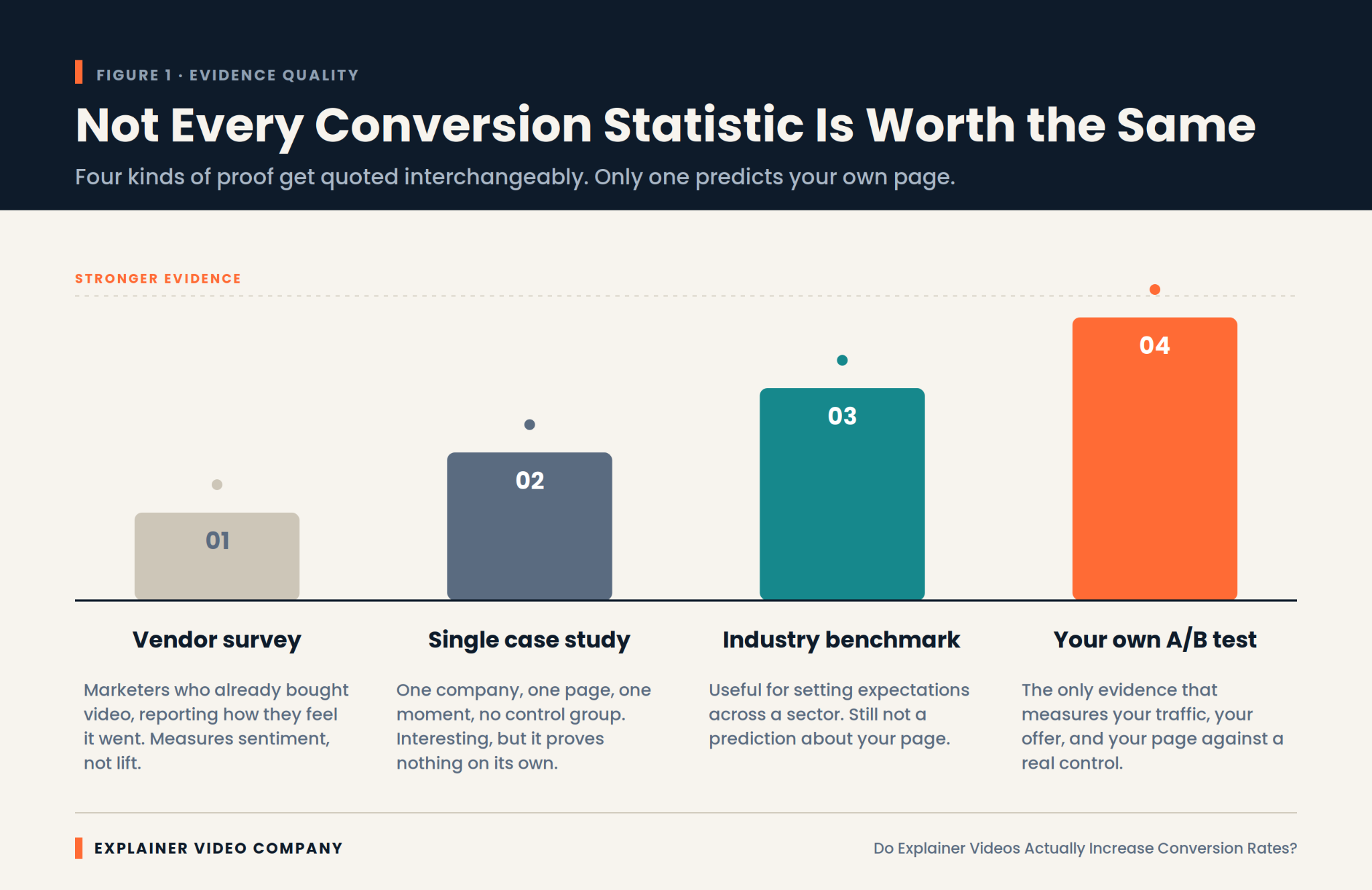
    Showing different types of conversion statistics.

    Most widely circulated figures trace back to one of two weak sources, and knowing which is which saves you from planning around fiction.

    The first is the vendor survey. A video company asks its customers and newsletter subscribers whether video helped. People who already bought video say yes. That result measures sentiment among a self-selected group, not lift.

    The second is the undocumented case study. A single company reports a dramatic improvement after adding a video. Usually there was no control group, the page was redesigned at the same time, and the traffic mix shifted. Something improved. Nobody can say what caused it.

    There’s a third layer that makes it worse. Statistics roundup articles cite each other in a loop, so a figure invented for one blog post in 2013 acquires a decade of apparent authority simply by being repeated. Trace any impressive number back two or three links and it often dissolves into nothing.

    None of this is dishonest exactly. It becomes misleading when these figures get quoted as though they were controlled experiments. Treat any statistic without a stated methodology as a claim rather than a finding.

    Why Does Video Move a Conversion Rate at All?

    It compresses understanding into less effort than reading does, for the specific kind of visitor who wasn’t going to read anyway. That’s the whole mechanism, and it explains both the wins and the failures.

    A visitor landing on an unfamiliar product page is deciding within seconds whether to invest attention. Text asks them to assemble meaning themselves. A well-made video assembles it for them, showing sequence and cause in a form that needs no reconstruction.

    That advantage isn’t universal, though. Usability research from the Nielsen Norman Group has long found that users scan pages rather than read them, and often skip video entirely when they’re hunting for a specific fact. Video wins on explanation. It loses on lookup.

    Any explainer video conversion gain therefore comes from one narrow place: turning confused visitors into oriented ones.

    The Effect Is Real, and the Range Around It Is Enormous

    Expect wide variance, because baseline performance varies wildly before video enters the picture. This is the part that makes single-number claims meaningless.

    Unbounce’s benchmark work on landing pages shows that median conversion rates differ several times over between industries. A page converting at 2 percent and one converting at 12 percent are not the same problem, and the same video will not do the same thing to both.

    Diminishing returns matter too. A page that already explains itself well has little comprehension left to gain. The biggest recorded improvements tend to come from pages that were performing badly for a diagnosable reason.

    So when someone quotes you a specific explainer video conversion rate improvement, the useful question isn’t whether the number is true. It’s what the starting point was.

    Which Pages Have the Most to Gain

    Prioritize pages where a visitor must understand something before they can act. Those are where the mechanism actually applies.

    In practice, that means product pages for unfamiliar categories, pricing pages where the model needs explaining, and homepages for companies whose category didn’t exist five years ago. It also means any page where analytics show high traffic, high bounce, and low time on page, which is the signature of people who arrived and didn’t understand what they found.

    SaaS landing page videos tend to perform well for exactly this reason, since software rarely explains itself from a screenshot. That pattern is consistent enough that our SaaS explainer video services start with a page audit rather than a script.

    Skip the pages that are already converting well. There’s more upside in fixing a bad page than polishing a good one.

    Length, Placement, and Autoplay Decide Half the Outcome

    Production decisions can erase the benefit entirely, which is why two companies run the same experiment and get opposite results.

    Length is the most common failure. Most pages are better served by sixty to ninety seconds than by three minutes. Placement matters nearly as much. A video below the fold gets seen by a fraction of visitors, and its measured effect drops accordingly.

    Autoplay with sound reliably annoys people. Muted autoplay with captions usually performs better than a static thumbnail, though this is worth testing rather than assuming. If you’re commissioning an explainer video for SaaS landing page conversion, settle these three things before scripting, since they change what the script has to do.

    Product Complexity Predicts Lift Better Than Anything Else

    If you only use one variable to forecast whether video will help, use how long it takes to explain the product. Complexity beats industry, budget, and design quality as a predictor.

    Try this test. Explain your product out loud in one sentence to someone outside your company. If they understand and can repeat it back, your page probably doesn’t need a video. If you find yourself starting over, or saying “so basically,” you’ve found the gap video fills.

    This is why explainer videos for SaaS and technical products show stronger results than they do for straightforward retail. There’s simply more confusion available to remove. Our guide to AI SaaS explainer videos goes deeper on products where the value is genuinely hard to see.

    Where Does a Video Fail to Move Anything?

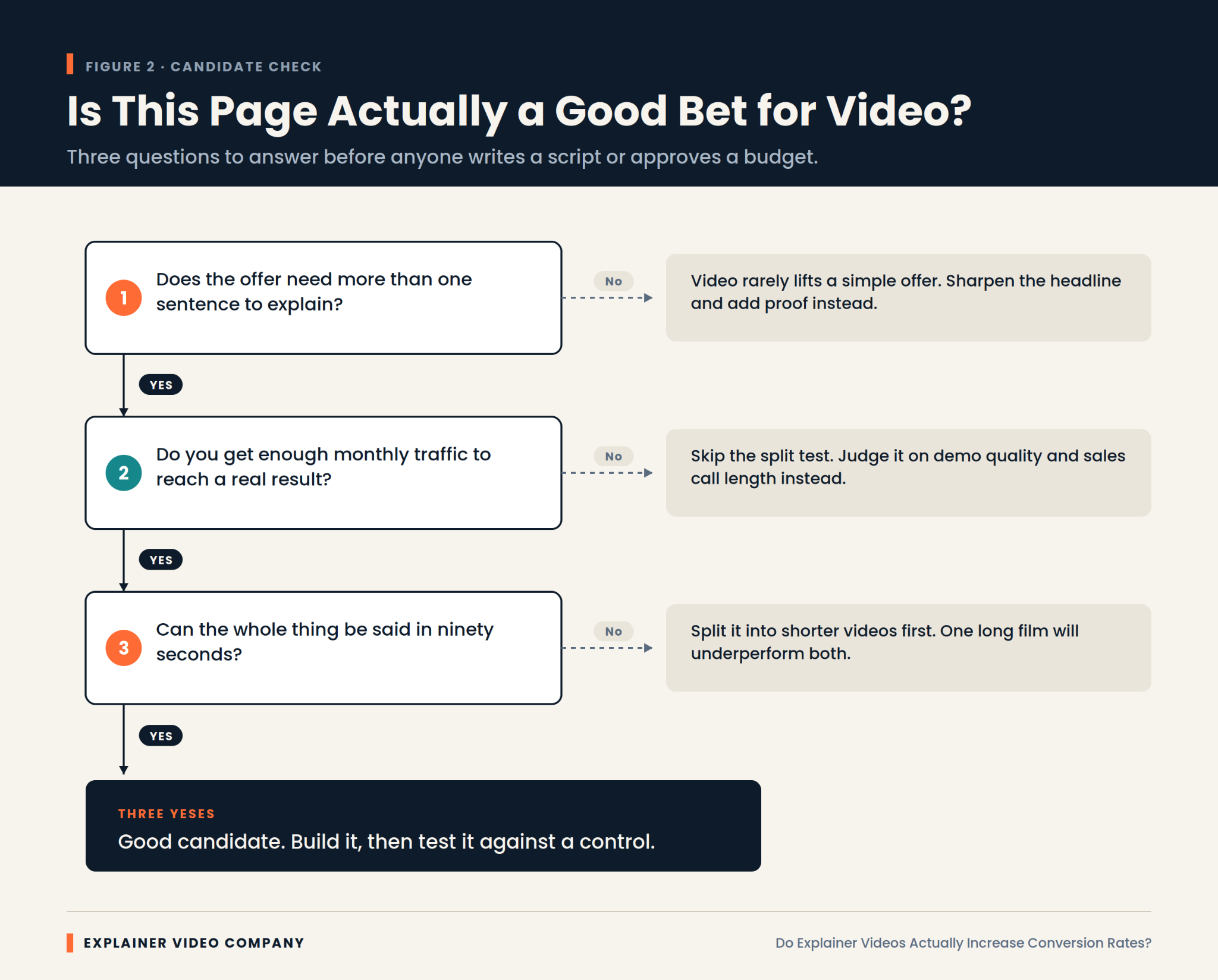
    An infographic about what to consider before moving forward with an explainer video.

    It fails whenever comprehension isn’t the problem. Several situations reliably produce no measurable lift, and recognizing them saves real money.

    Price objections don’t respond to explanation. If visitors understand the product perfectly and think it costs too much, a video restates the thing they already rejected.

    Trust gaps need proof, not narration. Missing reviews, no security information, and an unfamiliar brand are fixed with evidence rather than motion graphics.

    Broken funnels swallow every upstream gain. A signup form demanding fourteen fields will absorb whatever improvement the video created.

    Wrong traffic is the quietest failure. If your visitors were never plausible buyers, explaining the product better just helps them leave with more information.

    There’s also the case where the video competes with itself. Pages carrying a video, a demo booking widget, a chat prompt, and a free trial button give visitors four things to do at once. Attention splits, and the video takes the blame for a layout problem.

    Run the Test Properly or Don’t Claim the Result

    Measure with a control group, because without one you’re just observing that time passed. This is the step most teams skip and then regret in the next budget meeting.

    Split traffic between the page with the video and the page without it, running both simultaneously. Comparing this month to last month tells you nothing, since seasonality, campaign changes, and traffic mix all moved underneath you.

    Let it run to a real sample. Most pages need thousands of visitors per variant to detect anything smaller than a large effect, and stopping early because the first few days looked good is how imaginary wins get reported.

    Run it for whole weeks. Weekday and weekend traffic behave differently, and a test ending on a Wednesday quietly overweights one kind of visitor.

    Change one thing. Serious explainer video conversion optimization means resisting the urge to redesign the page at the same time, because then you learn nothing about either change.

    Regulated Sectors Play by Different Numbers

    Expect smaller measured lift and longer timelines in regulated industries, and judge the video by different criteria there. Financial services, healthcare, and insurance all behave differently.

    Two forces push against a clean result. Compliance review strips out the specific claims that make a video persuasive, and buying cycles run long enough that the conversion you’re measuring is a form fill rather than a sale.

    That doesn’t make video less valuable in these sectors. It makes conversion rate the wrong scoreboard. Lead quality, sales cycle length, and how often prospects arrive already understanding the product are better measures. Our piece on fintech explainer videos covers how to work within review constraints without producing something toothless.

    What Does the Video Actually Have to Return?

    A breakdown of whether it is worth creating an explainer video for your business.

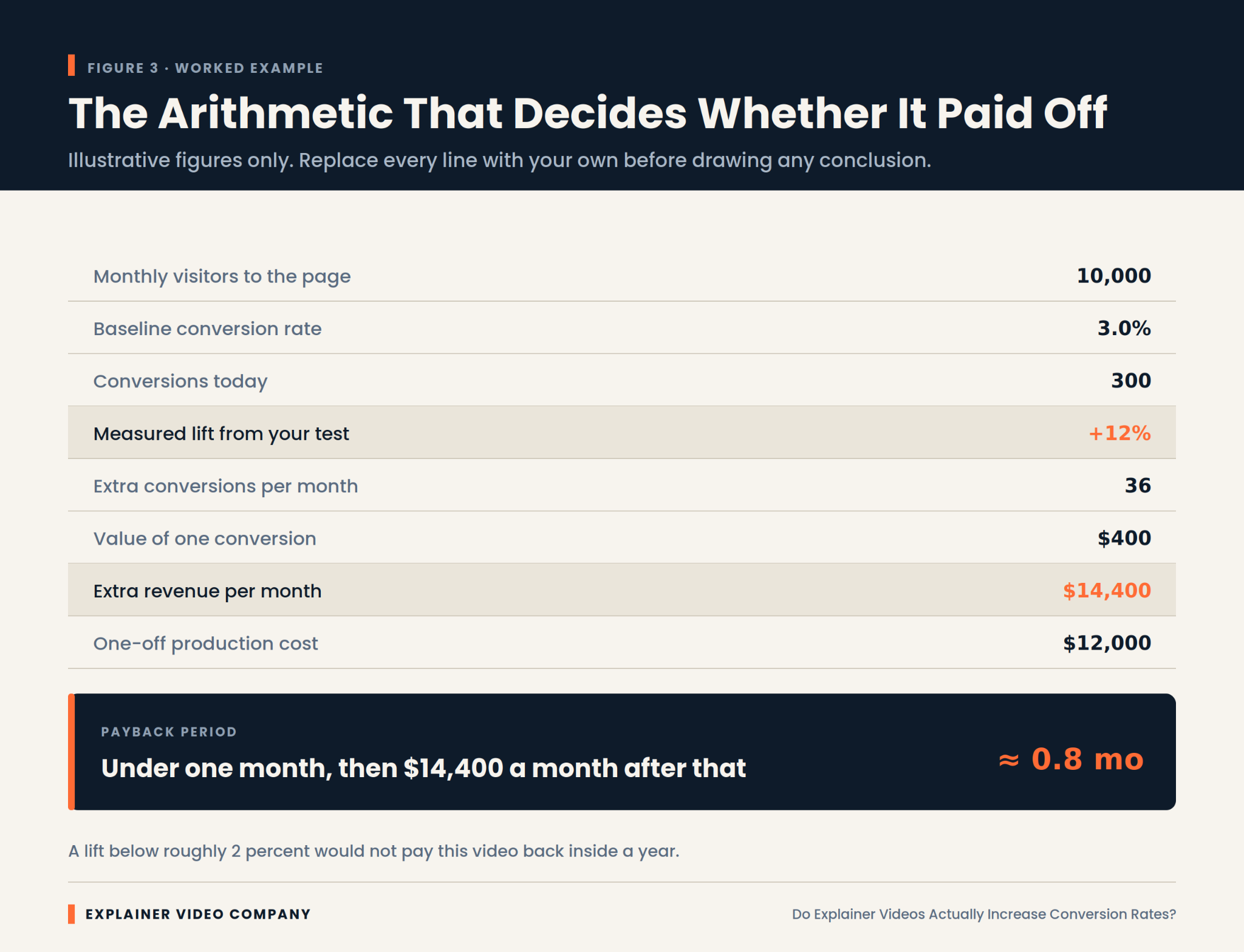
    Work out the break-even lift before you commission anything. It’s simple arithmetic, and it converts a vague hope into a number you can hold the project against.

    Take monthly visitors to the page, multiply by your current conversion rate, and you have today’s conversions. Decide what one conversion is worth. Then calculate what percentage improvement would cover production cost inside a year. That figure is your threshold.

    Sometimes the threshold is comfortably low and the decision is easy. Sometimes you discover the page needs a 40 percent improvement to break even, which is a strong signal to spend the money somewhere else.

    Cost is the other half of any explainer video ROI calculation, and it varies enormously between suppliers. Our guide on choosing the best explainer video company for your business covers what actually drives the quote.

    Final Words

    The honest answer to the title question is a qualified yes. Explainer videos increase conversion rates on pages where visitors are leaving confused, and they do very little on pages where visitors are leaving for any other reason.

    So diagnose before you commission. Check whether comprehension is genuinely your bottleneck. Calculate the lift you’d need to break even. Keep it short, put it above the fold, and test it against a real control.

    Explainer Video Company works this way because it produces defensible results rather than flattering anecdotes. If you’re weighing whether a video is the right spend for a specific page, an experienced explainer video production studio should be willing to tell you when the answer is no.

    Frequently Asked Questions

    Do explainer videos increase conversion rates?

    Often, but not always. The lift is real on pages where visitors struggle to understand the offer quickly, and close to zero where the obstacle is price, trust, or a difficult signup process. The honest answer depends on diagnosing why your current visitors are leaving.

    How do explainer videos increase conversions?

    By reducing the effort required to understand what you sell. Visitors decide within seconds whether to invest attention, and video delivers sequence and cause without asking them to assemble meaning from text. That converts confused visitors into oriented ones, which is the only mechanism at work.

    Can explainer videos improve landing page conversion rates?

    Yes, particularly on landing pages for unfamiliar products or complicated pricing. The improvement is largest where the current page performs poorly for a diagnosable reason. Pages already converting well have little comprehension left to gain, so expect diminishing returns there.

    Do explainer videos increase SaaS conversions?

    Software tends to respond better than most categories, because a screenshot rarely conveys what a product does across a workflow. That said, results still vary by page and offer. Treat the category advantage as a reason to test rather than a guarantee of improvement.

    How much can an explainer video increase conversion rates?

    There’s no reliable universal figure, and any specific percentage quoted without a stated methodology should be treated skeptically. Real outcomes range from no measurable change to substantial improvement, depending on how badly the page was underperforming beforehand. A confusing page has far more to gain than a clear one. The only number that applies to your page is the one your own test produces.

    Related Articles