Blog

  • Explainer Video vs Product Demo: Which One Does Your Business Need?

    Explainer Video vs Product Demo: Which One Does Your Business Need?

    Two people walk onto your website. One has never heard of your category and wants to know why they should care. The other has already shortlisted you against two competitors and wants to know whether your integration will break their workflow.

    The same video cannot serve both. That’s the practical heart of the explainer video vs product demo question, and it’s why the debate keeps going in circles. Teams argue about which format is better when the real variable is which visitor they’re talking to.

    This piece defines both formats properly, shows where each one works, and gives you a way to decide without guessing.

    Key Takeaways

    • These are not competing versions of the same asset. They answer different questions for people at different stages.
    • An explainer creates understanding. A demo supplies proof. Neither substitutes for the other.
    • Most businesses that think they need one actually need the explainer first, then the demo.
    • The single biggest waste is a hybrid that tries to do both jobs and does neither.
    • Length, audience knowledge, and technical depth decide the format far more than budget does.
    • Explainer video vs product demo is the wrong framing once you pass roughly ten employees. By then you likely need both, built in sequence.

    The Two Formats Do Different Jobs, and the Confusion Costs Real Money

    Treat these as two tools rather than two styles, because the vocabulary has drifted badly. Plenty of vendors label a screen recording an explainer, and plenty of marketers call a two-minute animation a demo.

    That drift matters commercially. A team asks for an explainer, receives a nine-minute feature walkthrough, and can’t understand why nobody watches it. Another commissions a beautiful animation for a page full of evaluators who wanted to see the actual software.

    Video itself isn’t the risky part of this. HubSpot’s research consistently finds that video ranks among the most used and most preferred content formats in marketing. The risk is spending video budget on the wrong job.

    So before comparing them, it’s worth being precise about what each format actually is.

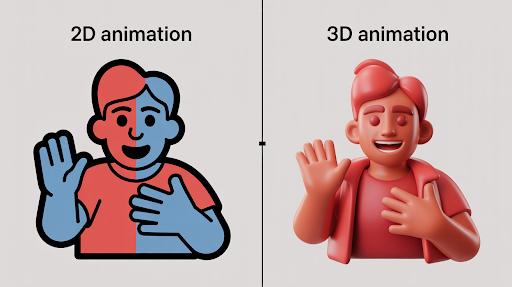
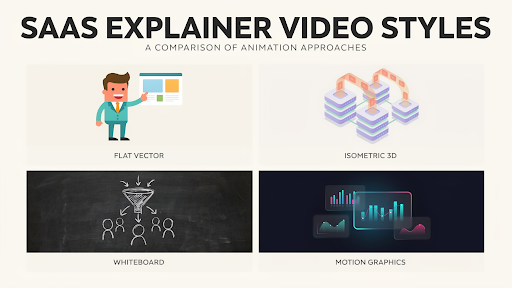
    What Separates an Explainer Video From a Product Demo? A visual representation of the difference between an explainer video and a product demo.

    An explainer video makes an unfamiliar idea understandable. A product demo proves a familiar promise is real. That single distinction drives every other difference between them.

    An explainer typically runs sixty to ninety seconds, uses animation or motion graphics, stays out of the interface, and speaks to someone who may not know your category exists. It sells the problem before the product.

    A demo runs anywhere from three to ten minutes, shows the real software doing real work, and speaks to someone who has already decided the problem is worth solving. It sells proof rather than possibility.

    Put simply, the difference between explainer video and product demo is the difference between “here is why this matters” and “here is it working.” One earns attention. The other earns confidence.

    The Explainer Sells the Problem, the Demo Sells the Proof

    Lead with whichever asset addresses your visitor’s current objection. The explainer removes confusion. The demo removes doubt. Those are different obstacles, and they appear at different moments.

    Confusion sounds like “I’m not sure what this does.” A viewer in that state needs context, a recognizable problem, and a clear outcome. Showing them a settings panel makes it worse.

    Doubt sounds like “I believe you, but will it work here?” That viewer has stopped needing persuasion and started needing evidence. Animation frustrates them, because animation can depict anything, including things the product cannot do.

    Because the explainer sits earlier, it tends to carry more measurable weight on landing pages and paid traffic. Our piece on explainer videos for increasing conversions covers where that effect is real and where it isn’t.

    Where Each One Sits in the Buying Journey Showing where each technology is better.

    Map each format to a stage rather than to a page, because coverage gaps are what actually hurt you. Framed this way, explainer video vs product demo becomes a question about coverage rather than preference. There’s a stretch in the middle where either could work, and that overlap is where most internal disagreements happen.

    An explainer covers the unaware and problem-aware stages well, still helps while someone is comparing options, and becomes almost useless once they’re deep in evaluation. A demo is the reverse. It’s wasted on a stranger and essential to a shortlisted buyer.

    This matters because B2B buyers move through several pieces of content before they ever speak to a salesperson. Research from Demand Gen Report has long shown that buyers consume multiple content assets during a single purchase decision, which means gaps in your coverage get filled by a competitor.

    Deciding between product demo vs explainer video for a single page is far less useful than auditing which stages currently have nothing.

    What an Explainer Video Cannot Do

    Don’t ask an explainer to close a technical evaluation. It will fail, and the failure looks like the video underperforming when the assignment was wrong.

    Four things sit outside its range:

    • It can’t answer configuration questions, because it never shows the configuration
    • It can’t satisfy a security or compliance reviewer who needs to see permissions
    • It can’t demonstrate that the product handles messy real-world data
    • It can’t replace hands-on time for a buyer who has already committed to evaluating you

    There’s also a credibility ceiling. Animation shows an idealized version of the product by definition. Sophisticated buyers know this, and past a certain point in their process, they discount anything that isn’t the real screen.

    What a Product Demo Cannot Do?

    Don’t put a demo in front of cold traffic. A demo assumes context the visitor doesn’t have yet, so it lands as noise.

    Demos are influential, which is exactly why teams overuse them. TrustRadius research into software buying has repeatedly found that product demos rank among the most influential resources for software buyers. That influence applies to buyers already in market, not to someone who arrived from a social post.

    Three specific limits are worth naming. A demo can’t establish why the problem matters, since it starts from the assumption that you agree it does. It can’t hold attention in a paid social feed, where ten minutes is unthinkable. And it dates quickly, because every interface change makes the footage slightly wrong.

    Good software demo videos also demand more from the viewer. That’s fine for an evaluator and fatal for a browser.

    Which One Should You Build First?

    Build the explainer first in almost every case. There’s a straightforward reason, and it holds for most companies below a few hundred customers.

    Traffic arrives at the top of the funnel in far greater volume than at the bottom. An asset serving the widest audience gets more use per dollar, and it feeds the demo by qualifying people before they request one.

    There’s a second argument that matters more than it sounds. Writing an explainer forces you to articulate your value in ninety seconds. Companies routinely discover during that process that their positioning was muddy, which is a cheaper thing to learn during scripting than during a sales call.

    The exception is a company selling exclusively into enterprise procurement with a small number of large deals. When every prospect already knows the category, choosing between an explainer video or product demo tilts toward the demo.

    Cases Where One Genuinely Replaces the Other

    A single asset can carry both loads in a few specific situations, so it’s worth knowing them before you commission two videos you don’t need.

    If your product is visually self-evident and your category is well understood, a short screen-recorded walkthrough can do the explainer’s job too. Project management tools often fall here. The interface explains the concept.

    If your category is genuinely new and there’s nothing to show yet, an explainer can stand in for a demo temporarily. Pre-launch companies do this out of necessity, and it works until buyers start asking to see the real thing.

    Gated video is the third case. A substantial explainer can act as a lead capture asset that replaces a demo request entirely for earlier-stage prospects, an approach we cover in explainer videos as lead magnets.

    Production Cost and Timeline Differ More Than People Expect

    Budget these differently, because their cost structures barely resemble each other. Assuming a demo is the cheap option is a common and expensive mistake.

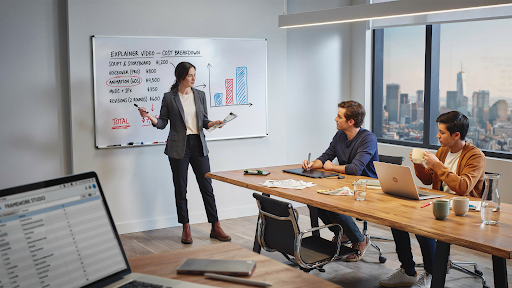
    An explainer front-loads its cost into scripting, storyboarding, illustration, and animation. Timelines usually run four to eight weeks. The cost is largely fixed regardless of your product’s complexity.

    A demo front-loads its cost into your own team’s time. Someone has to build a clean environment with believable data, run the workflow without errors, and re-record after every interface update. The invoice can look smaller while the internal cost runs higher.

    Recording also creates an ongoing obligation that animation doesn’t. Software explainer video production is a project with an end date, while demo footage is closer to maintenance. Our breakdown of in-house vs. outsourced explainer video production cost covers where each model makes sense.

    Do You Actually Need Both?Understanding the depth of each technology for users.

    Past a certain size, yes. Once you have meaningful top-of-funnel traffic and a real evaluation process, the two assets stop being alternatives and start being a sequence.

    A workable minimum for most software companies is one explainer on the homepage and key landing pages, plus one demo behind a form or on a dedicated page for people who ask. That’s two assets, not a library, and it settles the explainer video vs product demo debate by refusing it.

    Sequencing beats volume here. The strongest software explainer videos are built to hand a viewer cleanly to a demo, which outperforms four disconnected films because each asset has a job and a next step.

    If you’re weighing a software explainer video company against building in-house, the question to ask is whether they think in sequences or in deliverables. Our software explainer video services are structured around that handoff rather than around individual films.

    The Mistake That Ruins Both Formats

    Avoid the hybrid. The most common failure isn’t picking wrong, it’s refusing to pick and producing something in the middle.

    It usually arrives as a three-minute video that opens with thirty seconds of animated problem framing, then cuts into a feature tour. Newcomers leave during the tour. Evaluators skip the animation and find the tour too shallow. The asset gets used everywhere and works nowhere.

    The cause is organizational rather than creative. Marketing wants an explainer, sales wants a demo, one budget exists, and the compromise satisfies the meeting instead of the viewer. Teams that argue product demo video vs explainer priorities in a planning session tend to split the difference and lose both.

    If you’re stuck with a single budget, build the shorter asset properly and let a salesperson handle the depth in a live call. A clean ninety-second film plus a human beats a muddled five-minute one.

    Final Words

    The explainer video vs product demo decision resolves the moment you stop asking which format is better and start asking what your visitor is currently trying to find out.

    If they’re asking why this matters, they need an explainer. If they’re asking whether it works here, they need a demo. If you don’t know which they’re asking, that’s the actual problem, and no video fixes it.

    For most companies, the practical answer is an explainer first, a demo second, and a clear path from one to the other. Explainer Video Company builds them in that order for exactly that reason. Whether you work with another animated explainer video production partner, choose one that asks about your funnel before it asks about your brand colors.

    Frequently Asked Questions

    What is the difference between an explainer video and a product demo?

    An explainer video makes an unfamiliar idea understandable, usually in sixty to ninety seconds using animation and staying out of the interface. A product demo shows the real software completing real tasks, usually over three to ten minutes, for someone already evaluating you. One creates understanding, the other supplies proof.

    Can an explainer video replace a product demo?

    Only in specific situations. It can work if your category is genuinely new and there’s nothing to show yet, or if you’re capturing earlier-stage leads who aren’t ready to evaluate. It cannot replace a demo for buyers with configuration, security, or integration questions, because those need the real interface.

    What type of video should I use for my product?

    Match the format to what your visitor is currently trying to find out. If they don’t yet understand why your product matters, use an explainer. If they understand and want evidence it works in their situation, use a demo. High-traffic marketing pages usually need the explainer.

    Should I make an explainer video or a product demo first?

    Start with the explainer in most cases. It serves a much larger audience, works across more pages, and qualifies people before they request a demo. Writing it also forces clarity about your positioning. Enterprise-only companies with few large deals are the main exception.

    What is the best video for a SaaS product?

    Most SaaS companies get the best return from a short explainer on their main pages plus one demo available on request. Software rarely explains itself from a screenshot, so the explainer earns attention while the demo closes the evaluation. Which matters more depends on where your traffic currently arrives.

    Is an explainer video better than a product demo?

    Neither is better. They answer different questions at different stages, so comparing their quality is like comparing a headline to a case study. The useful question is which one your funnel is missing right now, and that depends on where prospects are dropping off.

    Related Articles

  • Do Explainer Videos Actually Increase Conversion Rates?

    Do Explainer Videos Actually Increase Conversion Rates?

    Every agency pitch deck contains a slide claiming that video lifts conversions by some impressive percentage. The number changes depending on who is presenting. The source almost never appears.

    So it’s worth asking plainly whether explainer videos move conversion rates, and if they do, by how much and under what conditions. The answer is more useful than the marketing version, because it tells you when to spend money and when to keep it.

    This piece separates what the evidence supports from what gets repeated, then shows you how to find out for your own site.

    Key Takeaways

    • Yes, but the honest answer is smaller and more conditional than the figures usually quoted at you.
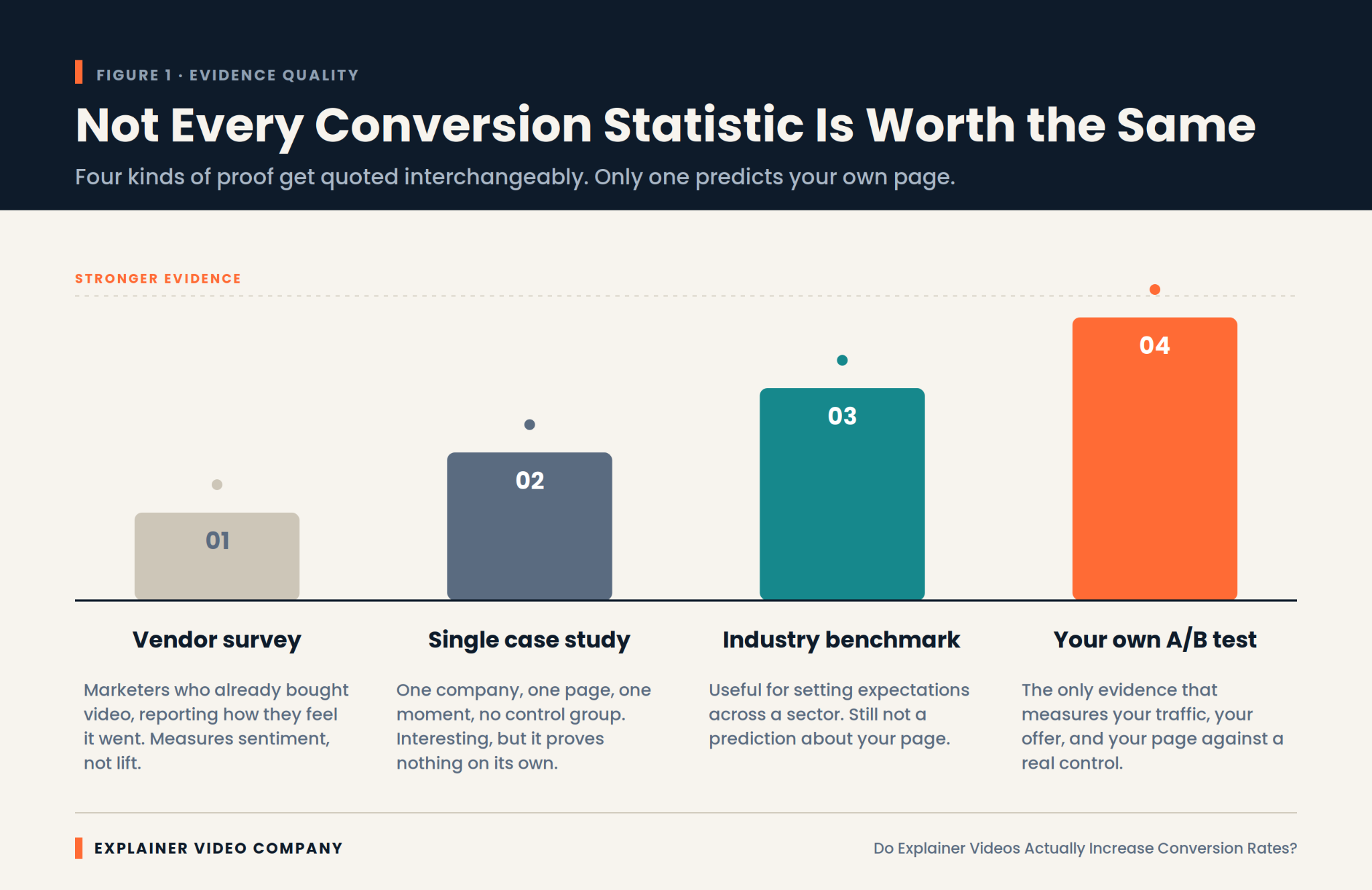
    • Most eye-catching statistics come from vendor surveys or single undocumented case studies, neither of which proves anything about your page.
    • The effect depends almost entirely on how hard your offer is to understand. Simple offers gain little.
    • Length, placement, and whether the video autoplays can matter as much as the video itself.
    • A controlled test on your own traffic is the only evidence that answers the question for you.
    • Work out the payback threshold before production starts, not after.

    The Short Answer: Yes, Though Rarely by the Margin You’ve Been Quoted

    Video does lift conversion on pages where the offer is hard to grasp quickly. That effect is real and repeatedly observed by teams running controlled tests.

    What isn’t supported is the idea of a fixed, transferable number. There’s no universal figure waiting to be applied to your landing page, because the size of the effect depends on your traffic, your offer, your price point, and how confusing your page currently is.

    A more accurate framing: video is a comprehension tool. When comprehension is the bottleneck, removing it moves the numbers. When something else is the bottleneck, such as price, trust, or a broken signup flow, adding a video changes very little.

    Teams treating explainer videos for conversions as a guaranteed multiplier tend to be disappointed. Teams treating them as a targeted fix for a specific problem usually aren’t.

    Where Those Famous Conversion Statistics Actually Came From

    Showing different types of conversion statistics.

    Most widely circulated figures trace back to one of two weak sources, and knowing which is which saves you from planning around fiction.

    The first is the vendor survey. A video company asks its customers and newsletter subscribers whether video helped. People who already bought video say yes. That result measures sentiment among a self-selected group, not lift.

    The second is the undocumented case study. A single company reports a dramatic improvement after adding a video. Usually there was no control group, the page was redesigned at the same time, and the traffic mix shifted. Something improved. Nobody can say what caused it.

    There’s a third layer that makes it worse. Statistics roundup articles cite each other in a loop, so a figure invented for one blog post in 2013 acquires a decade of apparent authority simply by being repeated. Trace any impressive number back two or three links and it often dissolves into nothing.

    None of this is dishonest exactly. It becomes misleading when these figures get quoted as though they were controlled experiments. Treat any statistic without a stated methodology as a claim rather than a finding.

    Why Does Video Move a Conversion Rate at All?

    It compresses understanding into less effort than reading does, for the specific kind of visitor who wasn’t going to read anyway. That’s the whole mechanism, and it explains both the wins and the failures.

    A visitor landing on an unfamiliar product page is deciding within seconds whether to invest attention. Text asks them to assemble meaning themselves. A well-made video assembles it for them, showing sequence and cause in a form that needs no reconstruction.

    That advantage isn’t universal, though. Usability research from the Nielsen Norman Group has long found that users scan pages rather than read them, and often skip video entirely when they’re hunting for a specific fact. Video wins on explanation. It loses on lookup.

    Any explainer video conversion gain therefore comes from one narrow place: turning confused visitors into oriented ones.

    The Effect Is Real, and the Range Around It Is Enormous

    Expect wide variance, because baseline performance varies wildly before video enters the picture. This is the part that makes single-number claims meaningless.

    Unbounce’s benchmark work on landing pages shows that median conversion rates differ several times over between industries. A page converting at 2 percent and one converting at 12 percent are not the same problem, and the same video will not do the same thing to both.

    Diminishing returns matter too. A page that already explains itself well has little comprehension left to gain. The biggest recorded improvements tend to come from pages that were performing badly for a diagnosable reason.

    So when someone quotes you a specific explainer video conversion rate improvement, the useful question isn’t whether the number is true. It’s what the starting point was.

    Which Pages Have the Most to Gain

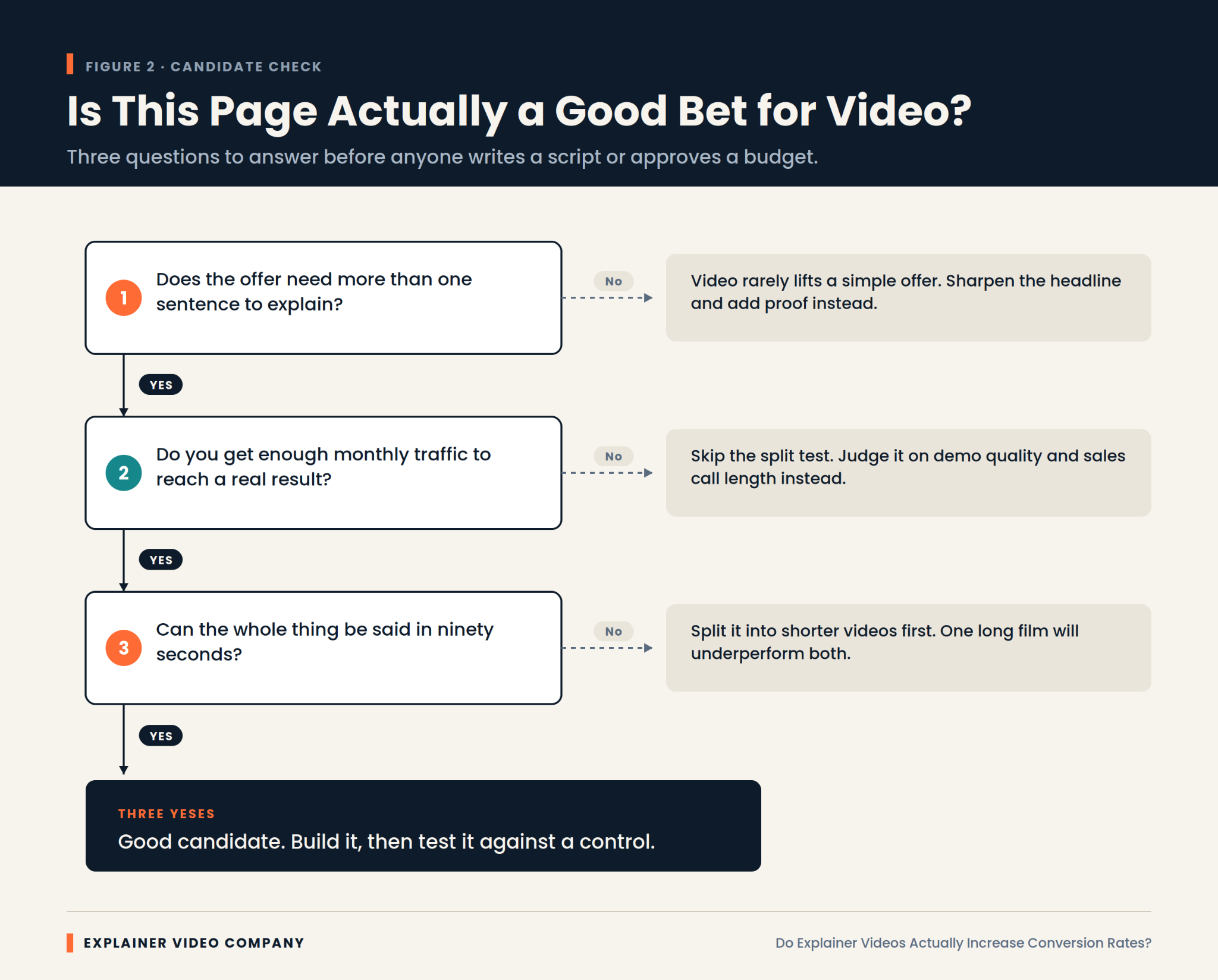
    Prioritize pages where a visitor must understand something before they can act. Those are where the mechanism actually applies.

    In practice, that means product pages for unfamiliar categories, pricing pages where the model needs explaining, and homepages for companies whose category didn’t exist five years ago. It also means any page where analytics show high traffic, high bounce, and low time on page, which is the signature of people who arrived and didn’t understand what they found.

    SaaS landing page videos tend to perform well for exactly this reason, since software rarely explains itself from a screenshot. That pattern is consistent enough that our SaaS explainer video services start with a page audit rather than a script.

    Skip the pages that are already converting well. There’s more upside in fixing a bad page than polishing a good one.

    Length, Placement, and Autoplay Decide Half the Outcome

    Production decisions can erase the benefit entirely, which is why two companies run the same experiment and get opposite results.

    Length is the most common failure. Most pages are better served by sixty to ninety seconds than by three minutes. Placement matters nearly as much. A video below the fold gets seen by a fraction of visitors, and its measured effect drops accordingly.

    Autoplay with sound reliably annoys people. Muted autoplay with captions usually performs better than a static thumbnail, though this is worth testing rather than assuming. If you’re commissioning an explainer video for SaaS landing page conversion, settle these three things before scripting, since they change what the script has to do.

    Product Complexity Predicts Lift Better Than Anything Else

    If you only use one variable to forecast whether video will help, use how long it takes to explain the product. Complexity beats industry, budget, and design quality as a predictor.

    Try this test. Explain your product out loud in one sentence to someone outside your company. If they understand and can repeat it back, your page probably doesn’t need a video. If you find yourself starting over, or saying “so basically,” you’ve found the gap video fills.

    This is why explainer videos for SaaS and technical products show stronger results than they do for straightforward retail. There’s simply more confusion available to remove. Our guide to AI SaaS explainer videos goes deeper on products where the value is genuinely hard to see.

    Where Does a Video Fail to Move Anything?

    An infographic about what to consider before moving forward with an explainer video.

    It fails whenever comprehension isn’t the problem. Several situations reliably produce no measurable lift, and recognizing them saves real money.

    Price objections don’t respond to explanation. If visitors understand the product perfectly and think it costs too much, a video restates the thing they already rejected.

    Trust gaps need proof, not narration. Missing reviews, no security information, and an unfamiliar brand are fixed with evidence rather than motion graphics.

    Broken funnels swallow every upstream gain. A signup form demanding fourteen fields will absorb whatever improvement the video created.

    Wrong traffic is the quietest failure. If your visitors were never plausible buyers, explaining the product better just helps them leave with more information.

    There’s also the case where the video competes with itself. Pages carrying a video, a demo booking widget, a chat prompt, and a free trial button give visitors four things to do at once. Attention splits, and the video takes the blame for a layout problem.

    Run the Test Properly or Don’t Claim the Result

    Measure with a control group, because without one you’re just observing that time passed. This is the step most teams skip and then regret in the next budget meeting.

    Split traffic between the page with the video and the page without it, running both simultaneously. Comparing this month to last month tells you nothing, since seasonality, campaign changes, and traffic mix all moved underneath you.

    Let it run to a real sample. Most pages need thousands of visitors per variant to detect anything smaller than a large effect, and stopping early because the first few days looked good is how imaginary wins get reported.

    Run it for whole weeks. Weekday and weekend traffic behave differently, and a test ending on a Wednesday quietly overweights one kind of visitor.

    Change one thing. Serious explainer video conversion optimization means resisting the urge to redesign the page at the same time, because then you learn nothing about either change.

    Regulated Sectors Play by Different Numbers

    Expect smaller measured lift and longer timelines in regulated industries, and judge the video by different criteria there. Financial services, healthcare, and insurance all behave differently.

    Two forces push against a clean result. Compliance review strips out the specific claims that make a video persuasive, and buying cycles run long enough that the conversion you’re measuring is a form fill rather than a sale.

    That doesn’t make video less valuable in these sectors. It makes conversion rate the wrong scoreboard. Lead quality, sales cycle length, and how often prospects arrive already understanding the product are better measures. Our piece on fintech explainer videos covers how to work within review constraints without producing something toothless.

    What Does the Video Actually Have to Return?

    A breakdown of whether it is worth creating an explainer video for your business.

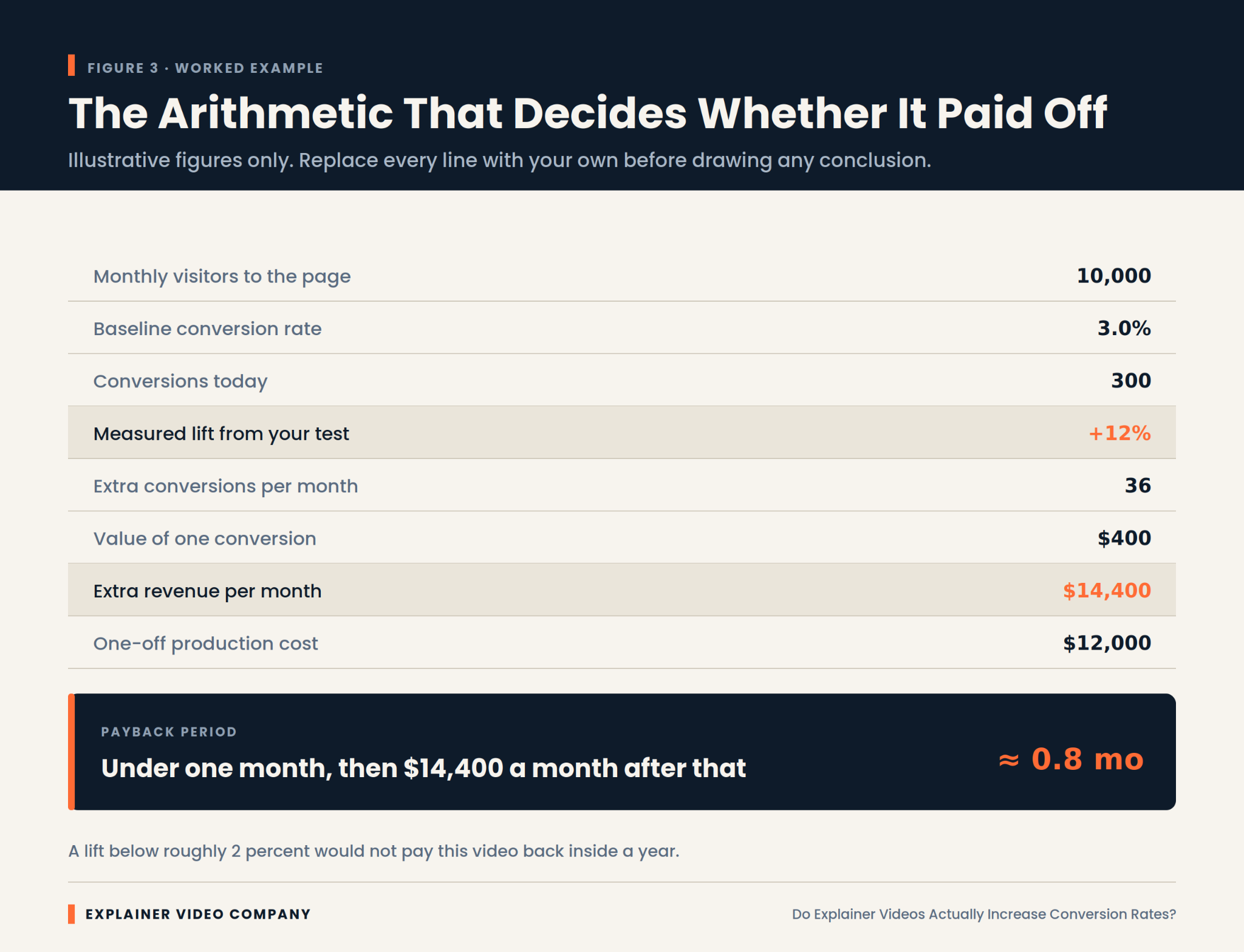
    Work out the break-even lift before you commission anything. It’s simple arithmetic, and it converts a vague hope into a number you can hold the project against.

    Take monthly visitors to the page, multiply by your current conversion rate, and you have today’s conversions. Decide what one conversion is worth. Then calculate what percentage improvement would cover production cost inside a year. That figure is your threshold.

    Sometimes the threshold is comfortably low and the decision is easy. Sometimes you discover the page needs a 40 percent improvement to break even, which is a strong signal to spend the money somewhere else.

    Cost is the other half of any explainer video ROI calculation, and it varies enormously between suppliers. Our guide on choosing the best explainer video company for your business covers what actually drives the quote.

    Final Words

    The honest answer to the title question is a qualified yes. Explainer videos increase conversion rates on pages where visitors are leaving confused, and they do very little on pages where visitors are leaving for any other reason.

    So diagnose before you commission. Check whether comprehension is genuinely your bottleneck. Calculate the lift you’d need to break even. Keep it short, put it above the fold, and test it against a real control.

    Explainer Video Company works this way because it produces defensible results rather than flattering anecdotes. If you’re weighing whether a video is the right spend for a specific page, an experienced explainer video production studio should be willing to tell you when the answer is no.

    Frequently Asked Questions

    Do explainer videos increase conversion rates?

    Often, but not always. The lift is real on pages where visitors struggle to understand the offer quickly, and close to zero where the obstacle is price, trust, or a difficult signup process. The honest answer depends on diagnosing why your current visitors are leaving.

    How do explainer videos increase conversions?

    By reducing the effort required to understand what you sell. Visitors decide within seconds whether to invest attention, and video delivers sequence and cause without asking them to assemble meaning from text. That converts confused visitors into oriented ones, which is the only mechanism at work.

    Can explainer videos improve landing page conversion rates?

    Yes, particularly on landing pages for unfamiliar products or complicated pricing. The improvement is largest where the current page performs poorly for a diagnosable reason. Pages already converting well have little comprehension left to gain, so expect diminishing returns there.

    Do explainer videos increase SaaS conversions?

    Software tends to respond better than most categories, because a screenshot rarely conveys what a product does across a workflow. That said, results still vary by page and offer. Treat the category advantage as a reason to test rather than a guarantee of improvement.

    How much can an explainer video increase conversion rates?

    There’s no reliable universal figure, and any specific percentage quoted without a stated methodology should be treated skeptically. Real outcomes range from no measurable change to substantial improvement, depending on how badly the page was underperforming beforehand. A confusing page has far more to gain than a clear one. The only number that applies to your page is the one your own test produces.

    Related Articles

  • AI SaaS Explainer Videos: How to Explain Complex AI Products

    AI SaaS Explainer Videos: How to Explain Complex AI Products

    A complex product rarely fails on video because the video was badly made. It fails because someone compressed an entire platform into ninety seconds, and what came out was a montage of features nobody could repeat afterward.

    That’s the core problem an AI SaaS explainer video has to solve, and it’s a structural problem before it’s a creative one. A single-feature tool has one story. A platform has twelve, aimed at five different people, sitting at four different points in a buying process. Squeezing all of that into one film produces something that technically covers everything and communicates nothing.

    This guide is about cutting the product into pieces that can be explained, then building the right video around each one.

    Key Takeaways

    • One AI SaaS explainer video cannot carry a whole platform. Complex products need to be broken into explainable units first.
    • Four decomposition axes work: by job to be done, by stakeholder, by workflow stage, and by funnel position.
    • A software-as-a-service (SaaS) purchase involves several reviewers with different doubts, so one video aimed at all of them usually convinces none of them.
    • Integrations belong in the video. Buyers reject products that don’t visibly fit the stack they already run.
    • The activation video is the highest-leverage asset most teams never build.
    • Ship a system of short, purposeful videos rather than one long tour of everything.

    The Platform Trap: Why One Video Can’t Carry a Complex Product

    The platform trap is the belief that a bigger product deserves a bigger video. It doesn’t. It deserves more videos, each doing less.

    The pull toward one comprehensive film is understandable. Budget is easier to approve once, and every stakeholder wants their module represented. So the script grows, the runtime stretches past three minutes, and each section gets thirty seconds that satisfy no one.

    Meanwhile, the audience has widened. McKinsey’s annual survey found that most organizations now report using artificial intelligence (AI) in at least one business function, which means the people evaluating your product are no longer just technical early adopters. They’re operations managers and finance leads with no patience for a platform tour.

    A single AI SaaS explainer video covering everything is a decision to explain nothing well.

    What Actually Makes an AI SaaS Product Hard to Explain?

    Four kinds of complexity cause the trouble, and they need different fixes. Diagnosing which one you have saves an enormous amount of wasted scripting.

    Surface area. Several products under one brand, with overlapping use cases. The viewer can’t tell where one ends and the next begins.

    Workflow depth. The value only appears after a sequence of steps. Any single screenshot looks unremarkable.

    Integration spread. The product’s worth depends on what it connects to, so showing it in isolation understates it badly.

    Invisible processing. The model does the interesting part where nobody can watch.

    Most teams asking how to explain complex software to customers assume they have a messaging problem. Usually it’s a scoping problem. The script isn’t unclear; it’s overloaded.

    Decompose the Platform Before You Write a Single Line

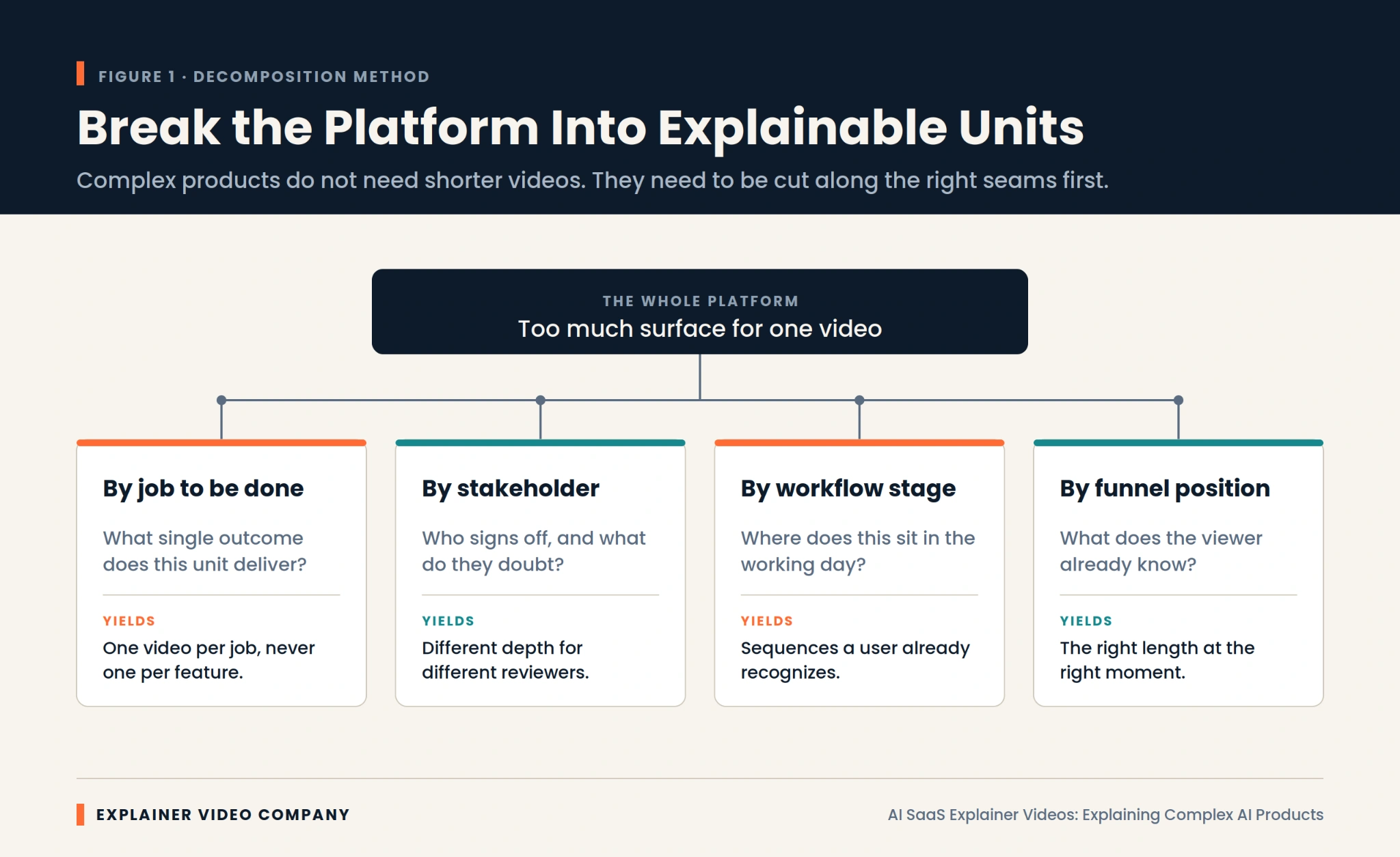
    Cut the product along one of four seams before scripting. This is the step that turns an impossible brief into a set of manageable ones.

    By job to be done. One video per outcome the customer cares about, never one per feature. Features are how you built it. Jobs are why they buy it.

    By stakeholder. Split by who signs off and what each of them doubts.

    By workflow stage. Break along the sequence of a real working day, so viewers recognize the shape of it.

    By funnel position. Divide by what the viewer already knows when they press play.

    Pick one axis and stick to it. Mixing two produces the same mush you started with. Teams wrestling with how to explain a platform with multiple products almost always find the job-to-be-done axis does the most work, and it’s the cut our SaaS explainer video production agency reaches for first.

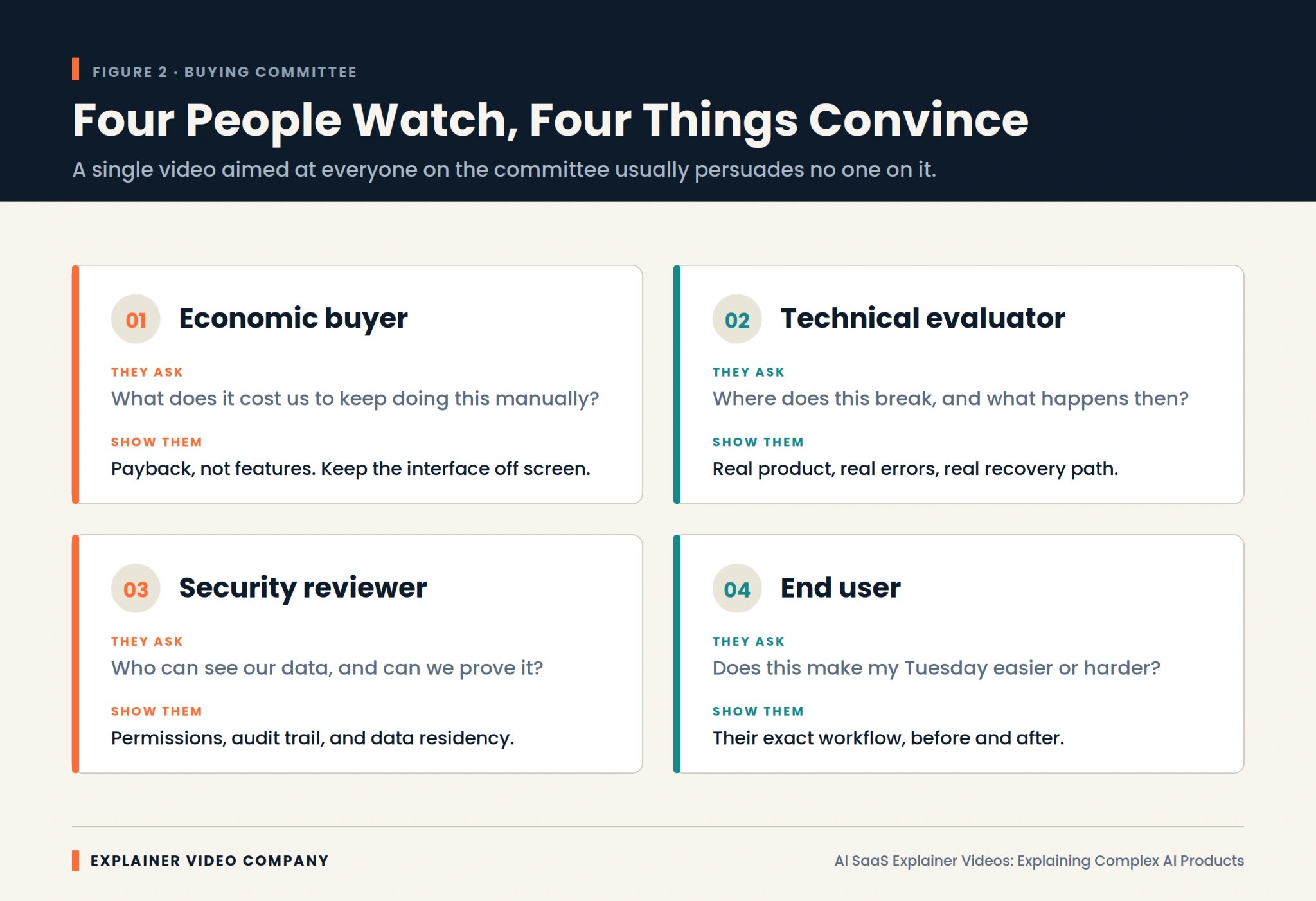
    Which Stakeholder Is This Video Really For?

    Name one person before writing, because a complex purchase is never decided by one viewer. Gartner’s research on business buying found that a typical purchase of a complex solution involves a buying group of six to ten decision makers, each arriving with a different fear.

    The economic buyer wants to know what it costs to keep doing this manually. Show payback, and keep the interface off-screen.

    The technical evaluator wants to know where it breaks. Show real errors and a real recovery path.

    The security reviewer wants to know who can see the data. Show permissions, audit trails, and residency.

    The end user wants to know whether Tuesday gets easier. Show their exact workflow, before and after.

    Write for one of them. The others get their own asset.


    Show Where the Product Sits in the Stack, Not Just the Interface

    Put the surrounding tools on screen, because nobody buys software that appears to live alone. A buyer watching your interface in isolation is quietly asking whether adopting it means abandoning the six tools their team depends on.

    Most product videos skip this, and it costs deals. A thirty-second passage showing data arriving from the systems they already run, passing through your product, and landing back in the tools they already open does more for credibility than another feature sequence.

    The trick to explaining software integrations is staying at the level of movement rather than architecture. Nobody needs to see an application programming interface. They need to see the handoff happen without anyone doing it manually. 

    Clean diagrammatic motion handles this well, which is why a 2D explainer video production company is usually the right partner for stack and workflow sequences.

    Map Each Video to a Funnel Stage, Not to a Product Tour

    Give every AI SaaS explainer video a stage and a job, because the same footage cannot serve a stranger and a paying customer. That’s the difference between a video and a video system.

    At awareness, run sixty to ninety seconds on the problem, with no interface and no feature names. At consideration, take two to three minutes and walk one job start to finish. At trial signup, spend thirty to forty-five seconds on what the first session looks like. At expansion, take two to four minutes on an adjacent job for a neighboring team.

    Any sound product-led growth video strategy follows this shape, because the trial itself is doing the selling and video’s role is to remove friction ahead of each step. Our overview of marketing video production covers how these assets get planned as a set rather than commissioned one at a time.

    The Activation Video Most SaaS Teams Never Make

    Build the video that gets a new user to their first real outcome, because that moment decides retention. Teams pour budget into acquisition films, then leave the post-signup window to a tooltip tour.

    Activation is where complex AI products lose people. The user signs up, sees an empty workspace, doesn’t know what good input looks like, and never returns. Nothing failed. They just never reached the point where it worked.

    Keep it short and specific. Vidyard’s benchmark data shows engagement falls sharply as business videos get longer, and an onboarding audience has even less patience than a prospect. 

    Among SaaS onboarding video best practices, the one that matters most is narrowing to a single first outcome and walking it end to end, using real sample data rather than a blank state.

    How Much of the AI Should You Actually Explain?

    Explain exactly enough for the output to be believable, then stop. There’s a real cost in both directions, which is why the question keeps coming up.

    Say too little, and the product reads as a black box the buyer must trust on faith. Say too much, and you’ve built a machine learning lecture that loses everyone in the first minute and still doesn’t close the sale.

    The workable middle is one visible layer. Show that the system retrieves from their documents, or that it flags low confidence, or that it routes edge cases to a person. One mechanism, shown rather than narrated.

    Depth should also scale with stage. Awareness videos can carry almost none. A security review deserves as much as the reviewer asks for.

    Keep One Visual System Across Every Video You Ship

    Lock the visual rules before the second video, because assets made piecemeal start looking like several different companies. Once you’re producing five or six videos, consistency stops being a nicety and becomes the thing that makes them feel like one product family.

    Fix the palette, the type, the motion timing, the way data appears on screen, and the logo treatment. Write it down. Every later AI SaaS video gets cheaper and faster because those decisions are already made.

    The logo animation deserves particular attention since it’s the one element appearing in every asset you’ll ever ship. Our piece on 3D logos that stand out in modern design is worth reading before you settle on a motion signature you’ll be living with for years.

    Match the Animation Style to How Much Complexity It Carries

    Choose the style by how much information the shot has to hold, not by what looks current. Techniques have genuinely different capacities.

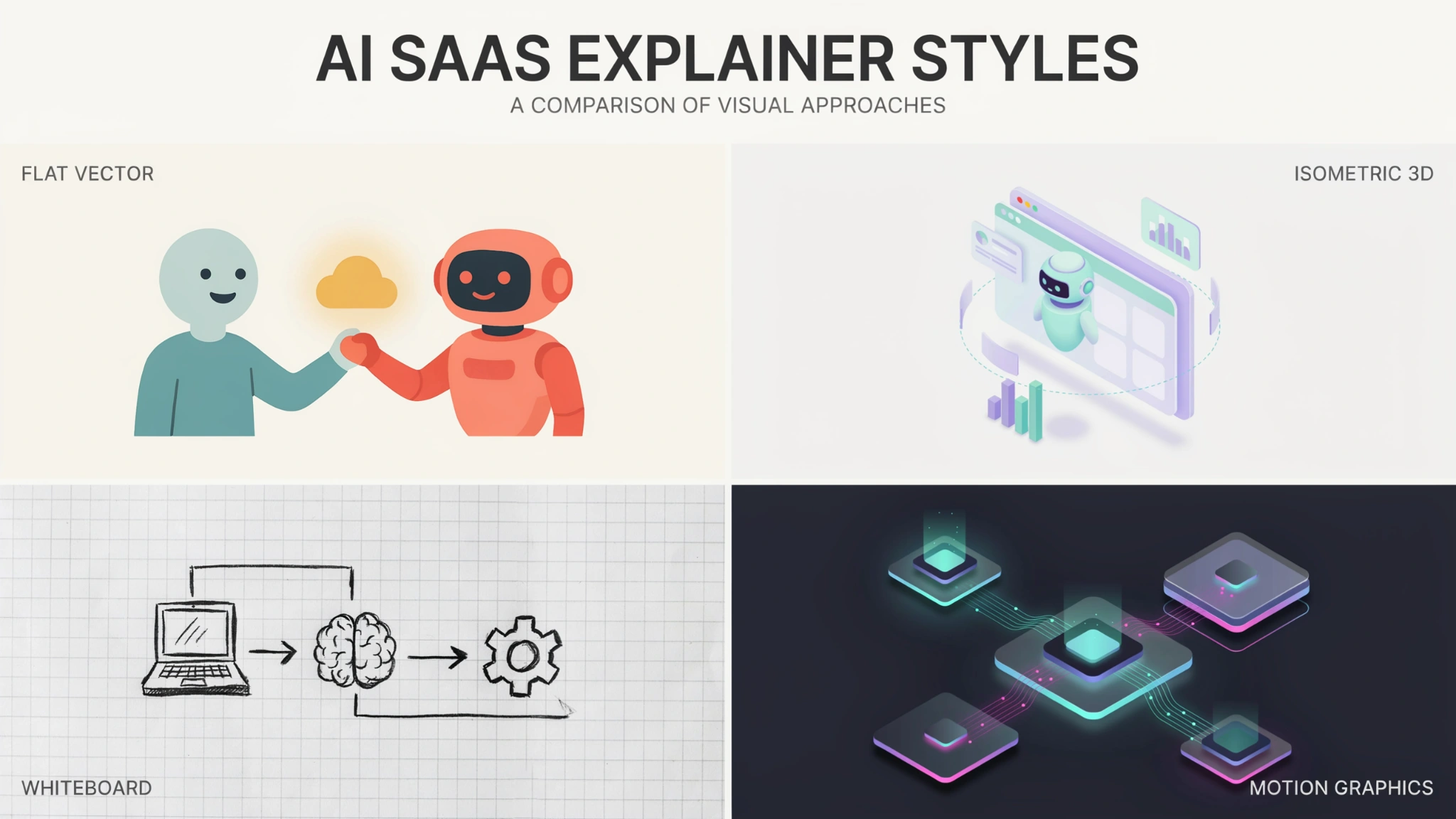
    Screen capture carries the most detail and the most proof, but a SaaS explainer video built only from screen capture can’t show anything the interface doesn’t display. Isometric illustration handles systems, stacks, and data movement well, since it shows several connected things at once without clutter. 

    Kinetic typography carries almost no complexity, which makes it right for a single sharp idea and wrong for a workflow. Character animation carries emotional context and is strongest for the human cost of a broken process.

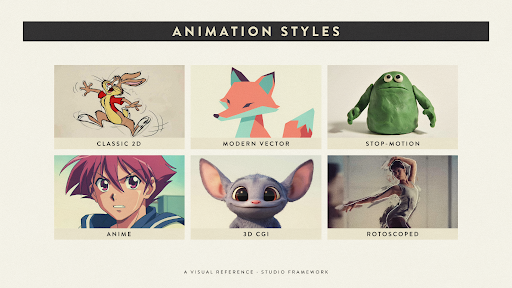
    Deciding what to include in a SaaS product video is largely a question of which of these you’re asking to do the heavy lifting. Our guide to the types of animation breaks down what each one is genuinely good at.

    Where 3D Earns Its Place in an AI SaaS Video System

    Reach for dimensional work when the story involves layers, scale, or physical context that flat graphics compress into confusion. Most pure software products never need it, and it’s worth saying so plainly.

    The exceptions are real. Infrastructure products with stacked architecture, platforms where data moves through several environments, and any AI product touching physical devices all benefit from depth. So does a hero brand film where the goal is presence rather than instruction.

    Used well, AI product animation in three dimensions makes an abstract system feel like an object the viewer can walk around. Used decoratively, it just costs more. Our 3D explainer video services exist for the first case, and we’ll usually tell you when you’re in the second.

    Final Words

    Stop trying to make the one perfect video. A complex AI product is explained by a set of short, purposeful assets that each do one job, not by a single film attempting all of them at once.

    The sequence is straightforward. Diagnose your kind of complexity. Cut the platform along one clear seam. Name the single stakeholder each video is for. Assign every asset a funnel stage. Build the activation video everyone else forgets. Lock a visual system so the set feels like one company.

    Explainer Video Company plans each AI SaaS explainer video this way, starting with decomposition rather than a script. If your product is more capable than your buyers currently understand, an experienced explainer video production studio will usually find the problem is scope rather than storytelling.

    Frequently Asked Questions

    What is an AI SaaS explainer video?

    It’s a short video explaining what an artificial intelligence software product does, who it’s for, and why its output can be trusted. Unlike a general product video, it usually has to handle a multi-step workflow, several integrations, and a review process involving more than one decision-maker.

    How do you make a complex SaaS product easy to understand?

    Reduce scope before simplifying language. Pick one job the customer cares about, one person you’re speaking to, and one moment in their process. Most confusing videos aren’t poorly written; they’re covering four things at once and giving none enough room.

    How long should a SaaS demo video be?

    Two to three minutes suits a consideration-stage walkthrough of a single job. Awareness videos work better at sixty to ninety seconds, and onboarding videos should stay under ninety. Length follows purpose, so a longer product means more videos rather than one longer video.

    How many videos does a SaaS company actually need?

    Most growing companies need four to six core assets: an awareness film, a job-level walkthrough, a trial preview, an activation video, and one expansion piece. More products or personas raise that count, but each addition should replace vague coverage with a specific job.

    Should a platform with several products have one video or several?

    Several, in almost every case. An umbrella film can establish the brand, but it can’t sell individual products, because each one has a different buyer and a different problem. Treat the umbrella video as a front door and the product videos as the rooms.

    What makes AI SaaS harder to explain than regular SaaS?

    Conventional software shows visible cause and effect on screen, while an AI product hides its most valuable step inside a model. Add the trust questions buyers bring to anything labeled intelligent, and you’re explaining both what it does and why its results hold up.

    Who should a SaaS onboarding video be aimed at?

    The person who just signed up, not the person who approved the purchase. Those are frequently different people with different goals. The buyer wanted business outcomes, while the new user simply wants to get one useful result before deciding the tool is worth learning.

    Related Articles


  • AI Explainer Videos: How to Explain an AI Product to Customers

    AI Explainer Videos: How to Explain an AI Product to Customers

    Most AI products share the same frustrating problem. The technology works, the results are real, and the buyer still leaves unconvinced. Nothing broke. The demo ran fine. The prospect just never got a clear picture of what the thing does for them on a Tuesday afternoon.

    Closing that gap is the job of AI explainer videos, and it’s harder than what a normal software video has to do. Sell a project management tool, and you can point at a screen while a task slides between columns. Cause, then effect. Sell an AI product and the interesting part happens where the buyer can’t look, and they’ve been oversold enough times to assume the worst.

    Key Takeaways

    • Artificial intelligence (AI) products are hard to sell because the work happens where nobody can see it, so the video has to manufacture visible proof.
    • Buyers move through four questions in order: what changes for me, did it really do that, why should I believe it, and what happens when it’s wrong.
    • Outcome comes first. Mechanism comes second, and only enough to make the outcome believable.
    • Technical evaluators and economic buyers check for different failure modes, which usually means two assets rather than one catch-all film.
    • Screen recordings prove capability while motion graphics explain the invisible middle. Most strong AI explainer videos use both.
    • Overclaiming what a model can do is now a regulatory exposure, not just a credibility problem.

    Why AI Products Break the Normal Rules of Product Marketing

    AI products break the normal rules because the thing you’re selling never appears on screen. There’s an input, a pause, and an output. The value lives inside that pause, and no camera can film it.

    Three pressures stack on top.

    Buyers are skeptical by default. After years of nearly every product rebranding itself as intelligent, purchasing teams discount AI claims before they finish reading them. Research from KPMG and the University of Queensland found that fewer than half of people across 47 countries are willing to trust AI systems, and that skepticism walks into your sales calls with them.

    They also can’t tell a serious system from a thin wrapper around someone else’s model. Two products make identical claims, and only one holds up under load.

    The vocabulary keeps moving too, so your video has to teach before it can persuade.

    What Does a Buyer Actually Need to See Before They Trust an AI Tool?

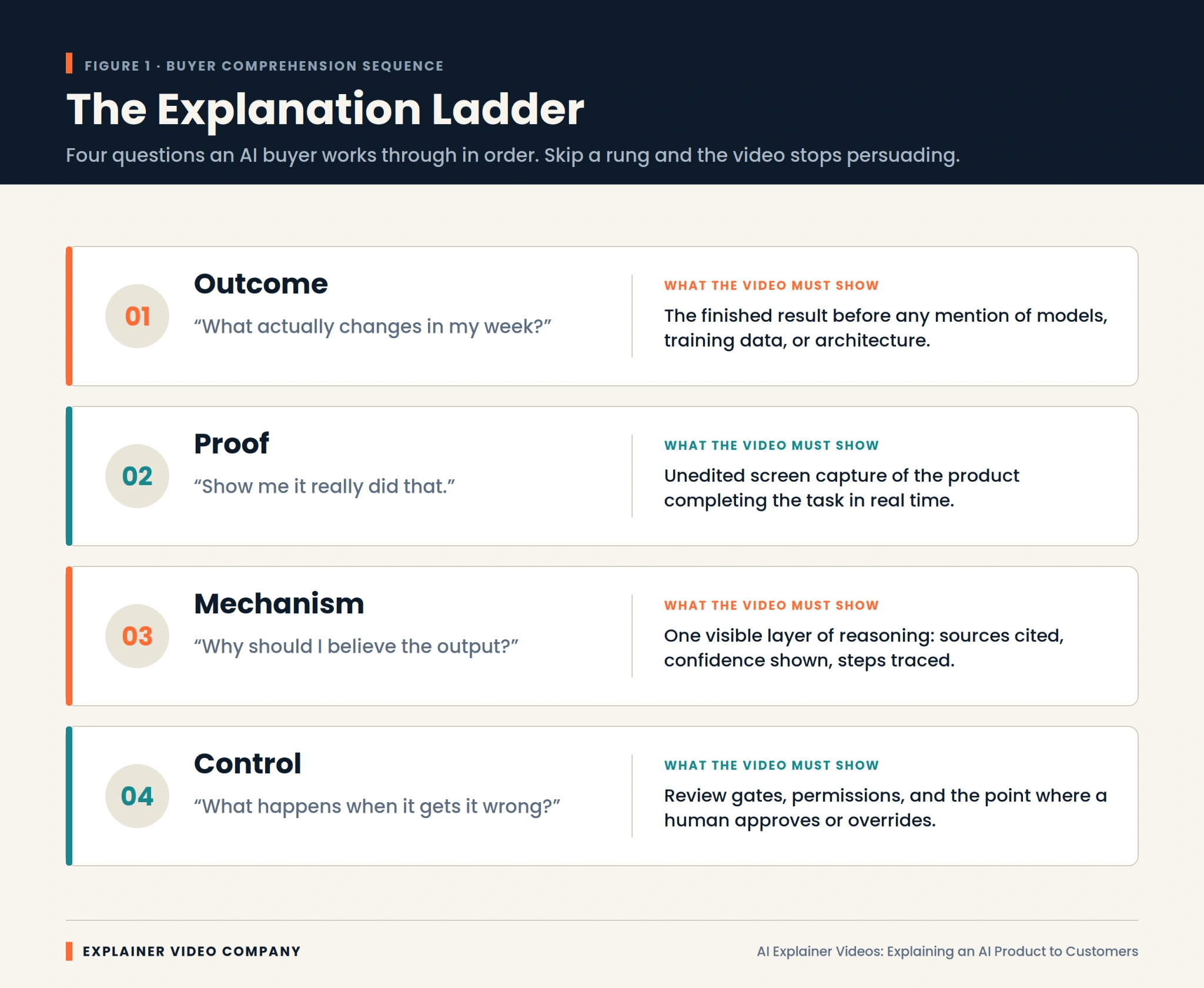
    They need four things, and the order matters more than the content. Buyers climb these rungs one at a time, and a video that skips one stops working there.

    Outcome. What actually changes in my week? The finished result, stated before any mention of models or architecture.

    Proof. Show me it really did that. Unedited screen capture of the product finishing the task, without cuts hiding the slow parts.

    Mechanism. Why should I believe the output? One visible layer of reasoning, such as sources cited or steps traced.

    Control. What happens when it gets it wrong? Review gates, permissions, and the moment a human approves or overrides it.

    Weak AI explainer videos nearly always fail at rung two. They assert the outcome with confident narration, then jump to a feature list. The buyer never saw it work, so nothing after that lands.

    Lead With the Outcome, Then Earn the Right to Explain the Mechanism

    Start with the result, because it’s the only part your buyer can evaluate without help. Anything technical you lead with is noise they have no framework for.

    The practical version: open on the broken process your buyer already lives with, show the output your product produces, then spend a short stretch on how it gets there. That mechanism section isn’t there to educate. It’s there to make the outcome credible. Once it’s done that, stop.

    Technical and Non-Technical Buyers Need Two Different Videos

    These audiences need different footage because they check for different failure modes. Simplify too far, and your engineering evaluator assumes you’re hiding something. Go too deep, and your economic buyer stops paying attention.

    Operations leads, marketing heads, and executives want the before-and-after, plus reassurance that adoption won’t cost them a quarter. Analogy helps. Jargon hurts. If you’ve wrestled with how to explain AI to non-technical people, the fix is almost always to describe the job it finishes, not the method.

    Technical buyers want the opposite: the real product on a real task, with data flow, permissions, and error handling visible. Polish makes them suspicious.

    Serving both in one film satisfies neither. A short outcome video plus a longer technical walkthrough performs better, which is how our SaaS explainer video services are usually structured.

    How Do the Best AI Companies Explain Themselves on Screen?

    Companies that explain AI well share one habit: they show real output instead of describing it. Studying strong AI explainer video examples is worth an hour before you write any script.

    Perplexity built its storytelling around citations appearing beside answers. That isn’t a feature demo. It’s a visual answer to the biggest objection anyone has about AI.

    Cursor demos inside a real code editor, for an audience that would instantly spot a staged environment. For developers, the demo is the pitch.

    Notion embedded its AI features into an interface people already knew, which removed the new-scary-thing reaction entirely.

    Glean and Harvey lean hardest on permissions and domain accuracy, because their buyers purchase governance as much as capability.

    One pattern across all four. Show the thing working, and answer the biggest doubt inside the demo rather than after it.

    Screen Recordings Prove Capability, Animation Explains the Invisible

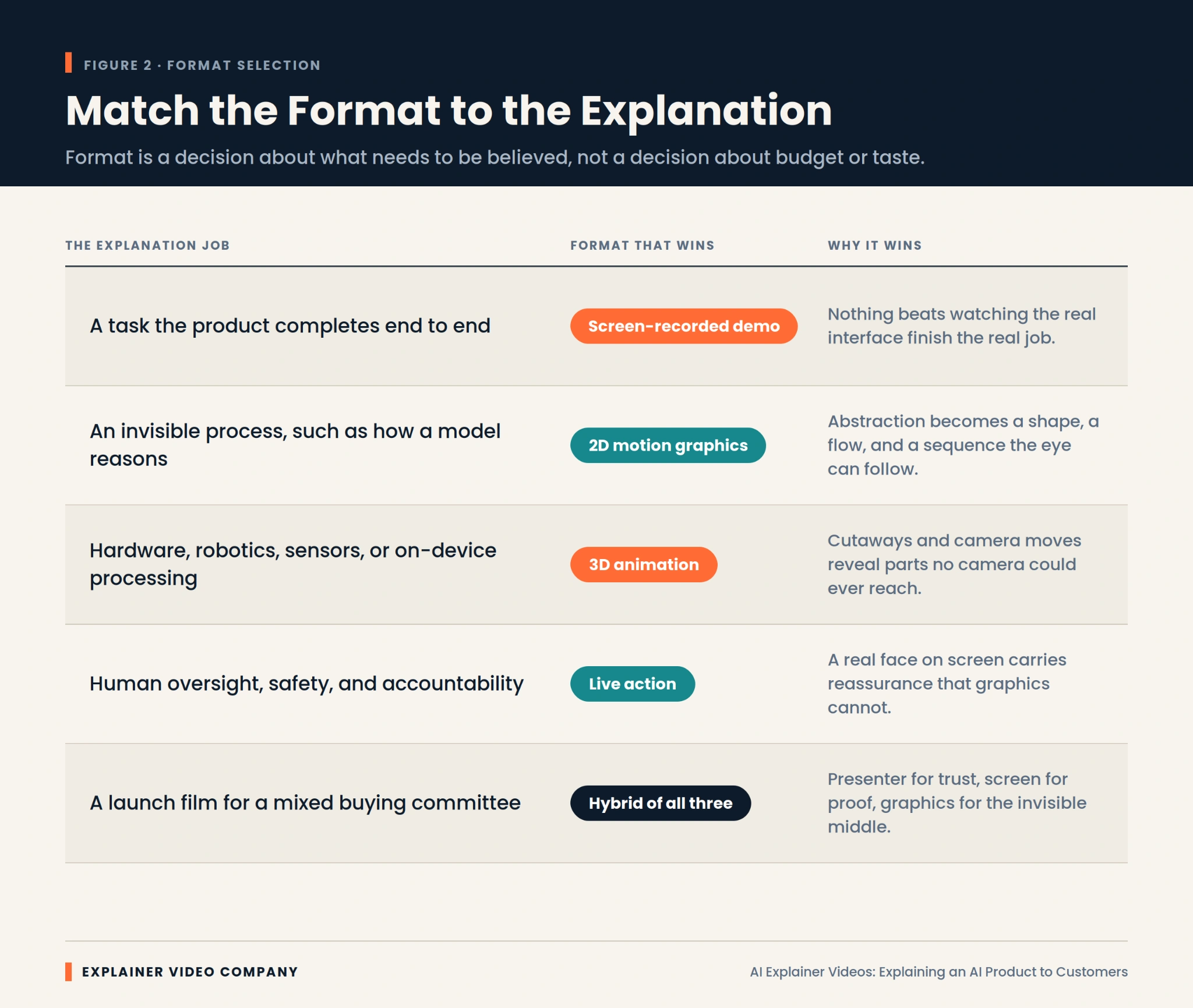
    Use screen recording for anything the product visibly completes, and animation for what happens between the click and the result. Choosing wrongly is the most common production mistake we see.

    Screen capture is unbeatable for proof. Real interface, real latency, real output. For agentic tools chaining several steps, watching the sequence unfold persuades better than any voiceover.

    Animation earns its place when there’s nothing to film. Retrieval, ranking, and confidence scoring have no natural visual form, so one has to be built. That’s the honest answer to how to explain a black box AI. 

    You don’t open the box. You draw a truthful diagram of what goes in, what comes out, and what the system checks on the way. Good 2D explainer video services turn that abstraction into a flow the eye follows in seconds.

    One caution: animate the parts you could have filmed, and viewers assume the real product isn’t ready.

    Hardware and Edge AI Need a Different Visual Treatment


    Physical AI products need dimensional treatment because the story involves components, placement, and physics that flat graphics flatten out. A vision system on a production line or a chip inside a sealed device involves spatial relationships a viewer needs to see from several angles.

    This is where 3D explainer video services do work nothing else can. Cutaways reveal a sensor array inside a housing. Camera moves show how a device perceives the space around it. The AI product animation puts an invisible processing layer inside an object the buyer will actually install.

    Software-only teams rarely need this, and it’s worth saying so rather than buying dimensionality you won’t use. For products sitting in between, our breakdown of 2D vs 3D explainer videos covers where each approach stops being worth the investment.

    What Should You Cut From an AI Product Video?

    Cut the model architecture, the funding announcement, the founder origin story, and every adjective you can’t demonstrate. Most first drafts run forty percent long, and the excess is self-description.

    Specifically, cut these:

    • Model names and parameter counts, unless you’re selling to machine learning engineers
    • Any claim of full autonomy your product doesn’t literally deliver
    • Stock footage of glowing brains, circuit boards, and blue particle grids
    • Competing calls to action at the end, which cancel each other out
    • Feature lists arriving before the viewer understands the outcome

    Cutting early protects budget too, since scope drives production spend more than anything. Our guide to explainer video cost breaks down where the money goes.

    The question of how to demo an AI product answers itself once you’ve deleted everything that isn’t the demo.

    Overclaiming Is Now a Legal Risk, Not Just a Credibility Risk

    Capability claims now carry regulatory exposure, which changes how scripts get written.

    In September 2024, the United States Federal Trade Commission (FTC) announced Operation AI Comply, a sweep of five enforcement actions against deceptive AI claims. Securities regulators separately charged investment advisers for overstating how much AI their systems used, and the European Union AI Act introduced transparency obligations covering disclosure when people interact with an AI system.

    For anyone working out how to market an AI product, the takeaway is simple. A video that demonstrates is safe. A video that asserts is exposed.

    Write claims you could defend with a recording. If your product needs human review before it acts, show that step instead of editing around it. Accuracy framed honestly reads as confidence, not weakness.

    A 90-Second Spine That Survives a Skeptical Viewer

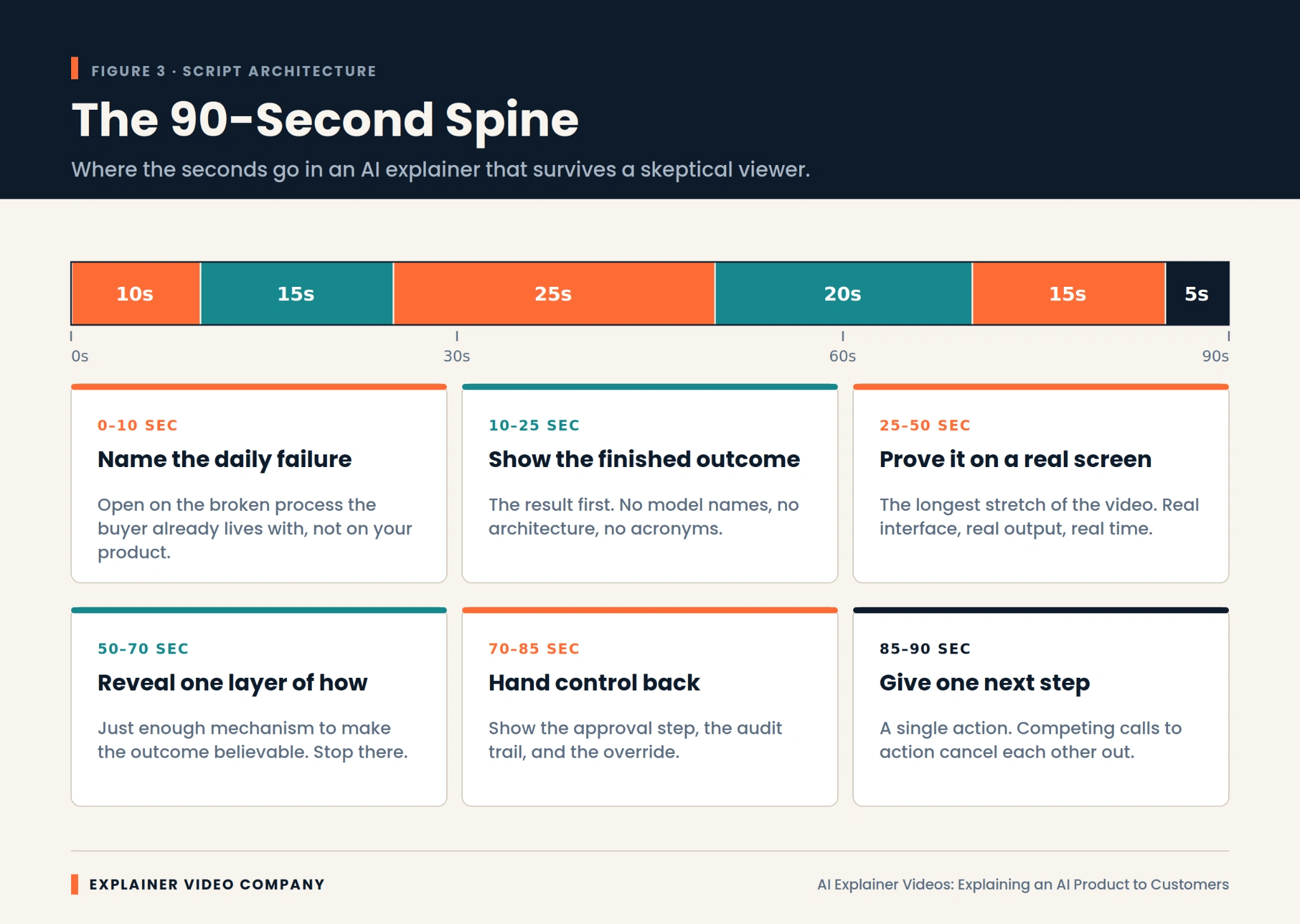
    Ninety seconds is plenty if they’re allocated properly. This structure holds up against a viewer who arrived expecting to be oversold.

    Spend the first ten seconds naming the daily failure your buyer already recognizes. Not your product. Their broken process.

    Give the next fifteen to the finished outcome, with no model names and no acronyms.

    Hand the following twenty-five, the longest stretch, to a real screen capture of the product working.

    Use the next twenty to reveal one layer of mechanism, and only one.

    Spend fifteen on where human control sits, then close with five seconds and exactly one next step.

    Among AI product demo best practices, that proportion is what most teams get wrong. In the strongest AI explainer videos, proof is the longest section, and in a first draft it almost never is.

    Measure Comprehension, Not View Count

    Track whether people understood the product, because view count says nothing about whether the explanation worked. Strong views with weak comprehension are an expensive way to confuse people faster.

    Three signals matter. Drop-off timing, since a cliff around twenty seconds usually means the outcome wasn’t clear. The questions arriving in sales calls, because effective AI explainer videos visibly change what prospects ask about. And demo-request quality, which improves as unqualified viewers self-select out earlier. Your sales team will tell you within two weeks whether it’s working.

    When evaluating production partners, ask how they measure comprehension rather than reach. It’s one of the more revealing questions covered in our guide on choosing the best explainer video company.

    Final Words

    A clear explanation compounds. Once a prospect understands what your AI does and why its output can be trusted, every downstream conversation gets shorter, and your team stops re-explaining the same concept.

    The work is mostly discipline. Outcome before mechanism. Capability proved with real footage. One layer of how it works, no more. Human control made visible. Claims limited to what you can demonstrate on screen.

    Explainer Video Company builds AI explainer videos around that sequence, matching format to what needs to be believed rather than to whatever looks impressive. If your product is stronger than your buyers currently realize, working with an experienced explainer video production company is the fastest way to close that gap.

    Frequently Asked Questions

    What is an AI explainer video?

    It’s a short video that shows what an artificial intelligence product does, proves it works using real footage, and explains enough about how it functions for buyers to trust the output. Unlike a standard product video, it has to make an invisible process visible.

    How do you explain artificial intelligence to a non-technical audience?

    Describe the job it finishes rather than the method it uses. Lead with the outcome, use a familiar comparison, and skip model names and technical shorthand. Show a real before-and-after, then add just enough mechanism to make it believable.

    How long should an explainer video for an AI product be?

    Sixty to ninety seconds works for awareness, where the goal is comprehension rather than evaluation. Technical walkthroughs for engineering or security reviewers can run three to five minutes, since that audience wants depth. Match length to buyer stage, not to a house standard.

    What is AI washing, and how do I avoid it in a video?

    AI washing means overstating how much artificial intelligence a product uses or what it can independently do. Avoid it by making only claims you can demonstrate on screen, describing human review steps honestly, and cutting language that suggests autonomy the product doesn’t deliver.

    Do explainer videos actually increase conversions?

    They usually do, though the effect depends on comprehension rather than production value. Videos that clearly answer what the product does and why its output can be trusted tend to improve demo quality and shorten sales calls. Feature descriptions without proof rarely move conversion.

    Should an AI product video show the interface or use animation?

    Use screen recording for anything the product visibly completes, since real footage is the strongest proof available. Use animation for processes with no visual form, such as retrieval or confidence scoring. Most effective AI animation sits alongside screen capture rather than replacing it.

    How do you demo an AI product that isn’t visually impressive?

    Shift focus from the interface to the transformation. Show the input as it arrives, then the finished output, compressing wait time honestly with an on-screen indicator. When the product looks plain, the contrast between a messy start and a clean result becomes the story.

    Related Articles

  • 2D vs. 3D Animation: Which Explainer Video Style Is Right for Your Brand?

    2D vs. 3D Animation: Which Explainer Video Style Is Right for Your Brand?

    Three companies enter a production meeting with the same question: should the video be 2D or 3D?

    One sells project-management software. Another manufactures a compact air purifier. The third is preparing patients for a medical procedure.

    The 2D vs. 3D animation choice will not be the same for all three, even if their budgets and video lengths are similar. Each company needs the audience to understand something different.

    That is where the decision should begin.

    Not with which style looks more expensive. Not with what a competitor used last month. Start with the part of the message that is currently difficult to see, explain, or believe.

    Three Briefs, Three Different Visual Problems

    The software company wants prospects to understand how much time is lost switching between disconnected tools.

    The appliance manufacturer needs buyers to see airflow moving through filters hidden inside the product.

    The healthcare organization wants to explain both the patient experience and what happens inside the body.

    These are different communication problems. Treating them as one visual question is how brands end up paying for animation that looks impressive but explains very little.

    An experienced animated explainer video company should be able to identify the visual problem before suggesting an animation style. A production team that recommends 3D after hearing only the budget is skipping the most important part of the discussion.

    The medium should follow the message.

    Brief One: The Software Company Does Not Need a Digital Product Model

    The software team initially asks for 3D because it wants the launch to feel important.

    But the product is not difficult to understand because of its shape. There is no physical object to rotate or open. The confusion sits in the user’s working day.

    A manager checks email for one update, opens a spreadsheet for another, and messages two coworkers for the rest. The product brings that information into one place.

    That story needs people, timing, and recognizable frustration.

    A 2D explainer video company can show the manager moving through the old process, losing time, and then handling the same task more calmly after the software appears. The video can shift between the character, simplified screens, icons, and process graphics without feeling like a technical demonstration.

    This is when to use 2D animation for business. The value lives in a situation people recognize, not in the physical construction of a product.

    What 2D Can Do Without Feeling Childish?

    Some business teams still hear “2D” and picture a playful cartoon.

    That is a design choice, not a limitation of the medium.

    A financial brand can use restrained colors, precise motion graphics, and simple figures. A healthcare video can use soft movement and realistic proportions. An education company may choose warmer character animation because emotional recognition matters more.

    The strength of a 2D explainer video is control.

    The production can move from a customer’s home to an office, then into an abstract workflow within seconds. It can show hesitation, delay, relief, or confusion without hiring actors or arranging several locations.

    It can also simplify information aggressively. A messy workflow may become four clean steps. An invisible risk can be represented through color or movement. Data can appear beside the character instead of interrupting the story with a separate presentation.

    That makes 2D especially effective for services, customer journeys, training, healthcare education, finance, nonprofits, and workplace communication.

    The Weakness of 2D Shows Up When Exact Form Matters

    Now return to the air purifier.

    The marketing team wants buyers to understand why its internal filter arrangement performs differently from cheaper models. A flat diagram could show the parts, but it may not make the airflow or spatial relationship clear.

    This is where 2D begins to work harder than it should.

    The company does not mainly need a customer story. It needs product visualization.

    A 3D explainer video company can remove the outer housing, separate the filters, and move the camera through the unit. Airflow can be represented clearly. The product can rotate while the viewer sees how each part connects.

    This is when to use 3D animation for product marketing. The audience needs to inspect something that ordinary footage cannot reveal.

    The extra production effort has a clear purpose.

    What a Strong 3D Explainer Actually Reveals

    An example of a 3D-animated explainer video

    A 3D explainer video earns its budget when depth carries information.

    Internal machinery can be exposed without physically cutting the product apart. A medical device can be shown inside the body. An architectural project can be presented before construction. A product still in development can appear finished and working.

    The camera is not limited by the real world. It can move through a pipe, beneath a surface, or around a component that is only a few millimeters wide.

    Materials matter too.

    Metal, glass, fabric, liquid, and plastic can be represented in ways that help buyers understand quality, construction, and use. Good lighting can clarify edges and surfaces. Poor lighting simply makes the object look dramatic.

    That distinction matters.

    A slow product rotation may look premium, but it is not automatically useful visual storytelling. The shot should reveal a feature, show a relationship, or support a buying decision.

    Otherwise, the brand is paying for movement rather than explanation.

    The Cost Difference Is Real, but It Is Not Always Simple

    3D usually requires more production stages.

    A model may need to be built or cleaned from CAD data. Materials are applied. Lights and cameras are placed. Moving parts may need controls. Every finished scene must then be rendered.

    That often means a larger video production budget and a longer animation timeline.

    Still, the assumption that all 2D is cheaper can cause problems.

    A short 3D product spin may be fairly straightforward. A detailed 2D film with frame-by-frame movement, expressive acting, and several original environments may take much longer.

    The real difference between 2D and 3D animation pricing comes from what must be designed, how much movement is involved, and how often assets can be reused.

    Do not compare the styles by label alone. Compare the actual work inside the scenes.

    Brief Three: The Healthcare Video Needs Both

    The third company is preparing patients for a procedure.

    Part of the video needs to show a person arriving, meeting the care team, and understanding what to expect. Another part needs to explain where a device is placed inside the body.

    Neither style can handle the whole message as effectively by itself.

    2D can carry the patient journey. It gives the story emotional distance and avoids making the experience feel graphic. The character can show uncertainty at the beginning and greater confidence after the explanation.

    Then the production can move into 3D for the anatomy and device placement.

    The combination works because each style has a separate job. The transition is not there to make the video feel more varied.

    This is the strongest reason to use a hybrid approach.

    Human context in 2D. Technical detail in 3D.

    Mixed Styles Can Also Waste Money

    A hybrid video is not automatically more effective.

    Some productions switch from 2D to 3D because the team worries one style will become boring. Others add interface animation, typography, characters, product renders, and live footage to make the film appear larger.

    The result can feel disconnected.

    Every change in visual language asks the viewer to adjust. That is worthwhile when the new style explains something the previous one could not.

    It is distracting when the change exists only for visual novelty.

    The best animation style for explainer videos may be one consistent method used carefully. A simple 2D film with a strong script will usually outperform a mixed production with no clear reason for its choices.

    Consistency is not dull when the story is moving.

    Brand Personality Does Not Decide the Medium by Itself

    Animators working on different explainer videos

    A serious company can use 2D.

    A playful brand can use 3D.

    The medium does not create the entire tone. Writing, pacing, color, camera movement, music, sound, and design detail shape how the video feels.

    This is where brand identity should guide the execution rather than dictate the format.

    A medical 2D video might use calm movement, clean anatomy references, and understated narration. A toy company may use exaggerated 3D shapes and energetic camera work. A premium software brand could combine elegant interface animation with restrained character scenes.

    Do not ask whether 2D or 3D matches the brand in general.

    Ask how the selected style should be directed so it feels like the brand.

    Revisions Feel Different in Each Production Pipeline

    A marketing director changes the brand color late in a 2D project. That may be inconvenient, but the team can often update the affected artwork without rebuilding everything.

    A product engineer changes the physical shape of a component during a 3D project. That adjustment may affect the model, materials, rigging, animation, lighting, and final renders.

    The revision risk is different.

    For 2D, settle the character designs, visual system, and storyboard before full animation begins. For 3D, approve the model and key materials before animating detailed scenes.

    Product stability matters especially in 3D.

    A company launching hardware should not begin final animation while engineering changes are still being made every week. The schedule will suffer, and so will the budget.

    Good production planning is not restrictive. It keeps small decisions from becoming expensive ones later.

    What Should a SaaS Company Choose?

    The question of 2D or 3D animation for SaaS videos is usually easier than software teams make it.

    Most SaaS products do not need full 3D.

    Their value sits in a task becoming easier, faster, or more organized. A SaaS explainer video company can show the old frustration through a short character scene, then move into a simplified interface demonstration.

    UI animation and motion graphics often carry the product portion better than realistic 3D.

    There are exceptions.

    Software connected to manufacturing, architecture, digital twins, robotics, virtual environments, or spatial computing may benefit from 3D because the platform interacts with physical space.

    For ordinary business software, though, 3D can become an expensive layer around a problem that is better explained through people and process.

    Show the user first. Show the interface when the story needs it.

    A Quick Decision Test

    Write one sentence describing what viewers must understand after the video.

    If the sentence focuses on a person, service, workflow, emotion, or abstract idea, begin by considering 2D.

    If it focuses on construction, internal movement, physical scale, materials, or spatial relationships, investigate 3D.

    If the sentence contains both a human experience and a technical process, a hybrid may be justified.

    Then test the choice against practical limits.

    How stable is the product design?
    How many stakeholders will review the video?
    Will the assets be reused later?
    Does the deadline allow for rendering?
    Will the content need regular updates?

    These questions are less exciting than browsing animation references. They are also far more useful.

    Final Words

    The 2D vs. 3D animation decision is not a contest between a basic style and a premium one.

    2D is often the better choice for services, characters, ideas, emotions, workflows, and software stories. 3D becomes valuable when the viewer needs to understand physical form, internal construction, movement, scale, or material.

    A mixed approach works when each medium solves a distinct part of the explanation.

    Start with what the audience cannot currently understand. Once that is clear, the right production style usually becomes much easier to defend.

    The best-looking choice is not always the right one.

    The clearest one usually is.

    Frequently Asked Questions

    It depends on the subject. Use 2D for services, people, customer journeys, software, and abstract ideas. Use 3D when the audience needs to inspect a product, mechanism, space, or internal process.
    Usually, but not in every case. Simple 3D product work can cost less than detailed frame-by-frame 2D animation. Complexity, movement, scene count, and revision needs influence the final price.
    Yes. 2D can look restrained, technical, premium, or corporate depending on the art direction. It does not have to resemble children’s entertainment.
    Use both when the story has a human side and a technical side. For example, 2D may show a patient experience while 3D explains anatomy or a medical device.
    Most SaaS explainers work well with 2D scenes, motion graphics, and simplified UI animation. 3D is more useful when the software connects to physical products, spatial systems, or technical simulation.

    Related Articles:

  • How to Choose the Best Explainer Video Company for Your Business

    How to Choose the Best Explainer Video Company for Your Business

    The first studio you like may not be the studio you should hire.

    Its showreel looks sharp. The animation feels expensive. The sales call goes smoothly. Still, none of that proves it is the best explainer video company for your business.

    The real test is less glamorous. Can the team understand your offer without copying the language from your website? Can it spot where your message becomes confusing? Will it challenge a weak brief, or simply animate whatever you send?

    Those questions matter because an explainer video is usually expected to do difficult work. It may need to shorten sales conversations, introduce an unfamiliar product, support a launch, or explain a service people keep misunderstanding.

    Pretty animation helps. Clear thinking helps more.

    Your First Shortlist Will Probably Be Too Broad

    Most searches begin the same way. You open several websites, watch a few reels, save the companies with the strongest-looking work, and request prices.

    The problem is that showreels are built to impress quickly. They combine the best five seconds from many projects. You see polished transitions, expressive characters, and smooth product shots. You do not see whether the full videos made sense.

    Before contacting anyone, reduce the field by defining the actual job.

    Is the video for a homepage, paid campaign, investor presentation, sales meeting, or onboarding flow? Does the audience already understand the problem? Is the product physical, technical, abstract, or software-based?

    This is the practical starting point for how to choose an explainer video company. You are not looking for the studio with the broadest talent. You are looking for one whose strengths match the communication problem in front of you.

    Pay Attention to the Questions Asked on the First Call

    The first conversation reveals a great deal.

    A weak production team may begin by asking how long the video should be, which animation style you like, and when you need it. Those details matter, but they should not lead the discussion.

    A stronger team asks different questions.

    Where do prospects get confused? What do they usually ask before buying? Which audience matters most? What happens after someone watches? Has the company tried to explain the same idea before?

    These questions show whether the studio thinks like an explainer video production company or simply an animation vendor.

    The distinction matters. An animation vendor waits for instructions. A production partner helps shape the message before the expensive work begins.

    Listen closely during that first call. The quality of the questions often predicts the quality of the script.

    Watch Complete Videos, Including the Boring Ones

    Do not stop at the homepage reel.

    Ask to see full projects, preferably ones with a similar audience, length, or level of difficulty. A complete video production portfolio tells you whether the studio can hold attention after the first ten seconds.

    Watch with the sound off once. Do the visuals still carry meaning? Then listen without looking at the screen. Does the script sound natural, or does it feel like website copy read by a professional voice actor?

    An experienced animated explainer video company should be able to show more than technical skill. Look for control. The opening should establish a problem quickly. The middle should not become a feature dump. The ending should lead toward one sensible next step.

    Also notice whether every project looks suspiciously similar. Repeated character designs, identical camera moves, and the same scene structure may suggest a template-based process.

    Templates are not automatically bad. They are simply a poor fit when you are paying for a video expected to represent the brand for several years.

    Industry Experience Helps, but It Can Be Overrated

    Exact industry experience feels reassuring.

    A medical company naturally wants a team that understands scientific review. A financial business may prefer a studio familiar with compliance. An industrial manufacturer may need animators who can read technical drawings.

    That experience can shorten the learning process. It should not become the only requirement.

    A studio may never have worked in your exact field but still understand how to explain technical systems, handle cautious buyers, or manage several rounds of specialist approval.

    Look for similar communication challenges rather than matching logos.

    Has the team turned complicated material into plain language? Has it worked with products that did not yet exist? Can it show a process that is difficult to film? Does it know how to ask for expert review without allowing the script to become unreadable?

    Relevant thinking is more useful than superficial familiarity.

    Ask to See How the Script Is Developed

    A beautiful video can survive average illustration. It rarely survives a poor script.

    Ask who writes the script, what information that person receives, and how many people review it before storyboarding begins.

    Good scriptwriting and storyboarding should not start with the studio copying paragraphs from your website. The writer needs access to the audience problem, sales objections, product details, and the outcome the business wants.

    The storyboard then tests whether the words and pictures are sharing the explanation properly.

    A weak storyboard merely illustrates each sentence. If the voice says “teams lose time,” the screen shows a clock. If the voice says “communication improves,” speech bubbles appear.

    A better storyboard adds information. It shows where the delay happens, who is affected, and what changes after the solution is introduced.

    This stage is where the company proves it understands the idea, not just the chosen animation style.

    The Process Should Feel Clear Before You Sign

    Many studios describe the same broad stages: discovery, script, storyboard, design, animation, and delivery.

    The useful details sit underneath those labels.

    Who leads the project? When do you approve the visual direction? Will you see an animatic before full animation? How is feedback gathered? What happens when two stakeholders disagree?

    A dependable creative process gives you clear moments to make decisions.

    It should also protect the production team from endless changes. Once a scene is fully illustrated and animated, replacing the central idea is no longer a small edit.

    The company should explain this without sounding defensive. Clear boundaries are not a warning sign. Vague boundaries are.

    Decide Whether You Need Custom 2D or Just a Clean Message

    An example of 2D animated explainer video

    2D animation works for far more than cartoon-style storytelling.

    It can explain services, show workplace situations, simplify healthcare topics, introduce a financial process, or visualize something that would be expensive to film.

    A 2D explainer video company is a good fit when the message depends on people, emotions, customer journeys, or abstract ideas.

    Ask how much of the work will be original.

    Will the characters and environments be designed for your brand? Are prebuilt assets being adapted? Can the same design system support future videos?

    There is a place for both template-led work and custom animation. The choice should reflect how important and long-lasting the asset will be.

    A short internal training clip may not require an original visual world. A homepage video being used across sales, advertising, and social media probably deserves more care.

    Compare Proposals Line by Line, Not Price by Price

    Two companies may quote $6,000 and $9,000 for what appears to be the same job.

    Often, the scope explains the gap.

    The higher proposal may include scriptwriting, professional voice talent, captions, licensed music, several delivery formats, and an extra review stage. The lower price may cover animation only.

    This is how to compare explainer video production companies fairly. Send each studio the same brief, then compare what is actually included.

    Check the number of concepts, revision stages, final formats, usage rights, voiceover terms, source files, and expected timeline.

    Ask about possible extras too. A vertical version, foreign-language edit, rush request, or revised software screen may carry a separate fee.

    The cheapest proposal can become expensive when basic deliverables were never part of the original number.

    Use 3D Because It Explains Something

    3D looks impressive, which is exactly why companies sometimes choose it for the wrong reason.

    A 3D explainer video company makes sense when the audience needs to understand form, internal construction, physical movement, scale, materials, or a product that has not yet been manufactured.

    Look carefully at technical accuracy in the portfolio. Attractive lighting is not enough. Parts should move correctly. Materials should behave believably. Camera movement should reveal information rather than circle the object for effect.

    Ask what reference material is needed. The studio may request CAD files, engineering drawings, product photography, or access to a technical specialist.

    3D usually carries a larger budget and longer video production timeline. It should earn that extra investment by showing something 2D, live action, or ordinary photography cannot.

    Review the Revision Rules Before the Project Begins

    A sentence such as “two rounds of revisions included” sounds clear until feedback starts.

    Two rounds across the entire project? Two rounds at each stage? Does one email count as a round, even when it contains notes from only one department?

    Read the revision policy before signing.

    A fair agreement gives you meaningful opportunities to review the script, storyboard, design, and animation. It should also explain when a request becomes a scope change.

    Changing one color is not the same as replacing the visual concept. Correcting a production error is not the same as rewriting an approved script after leadership sees it for the first time.

    Bring the real decision-makers in early. Late internal feedback is one of the fastest ways to damage a schedule and increase the budget.

    Software Companies Need a Very Specific Kind of Partner

    Different types of SaaS explainer video content

    Choosing an explainer video company for SaaS requires more than finding someone who can animate a screen.

    Software videos often fail because they show too much. The cursor moves from feature to feature while the voiceover tries to explain the entire product.

    A capable SaaS explainer video company starts with the user’s frustration and the outcome the platform creates. The interface appears when it helps tell that story.

    Review how the studio handles UI. Is the screen readable on mobile? Does the viewer know where to look? Are real product screens simplified carefully, or changed so heavily that they become inaccurate?

    The company should also understand the difference between a homepage explainer, feature demo, onboarding tutorial, and paid advertisement.

    They may share visual assets. They do not share the same purpose.

    Talk to Past Clients About the Difficult Parts

    Testimonials usually describe a successful ending. Ask about the middle.

    Look for independent client reviews, then speak to one or two recent clients when the project carries a significant budget.

    Ask whether the original estimate remained accurate. Did the producer communicate delays early? Was feedback handled well? Did the final delivery include everything promised?

    Creative production always contains a few uncomfortable moments. A script may need another draft. An animation test may not work. A deadline may be threatened by late feedback.

    The important question is how the company behaves when the project becomes less convenient.

    That is often what to look for in an explainer video agency. Reliability is easier to judge through problems than through a polished sales presentation.

    The Final Decision Is Usually About Fit

    After the portfolio reviews, proposals, and calls, you may still have two good options.

    At that point, stop looking for a perfect scorecard.

    Choose the team whose strengths fit the project. Consider how much guidance your company needs, how many people will approve the work, and how much risk sits behind the launch.

    Your final questions to ask an explainer video company should be direct:

    Who owns each stage?
    What could change the price?
    What do you need from us each week?
    Where do projects like this usually go wrong?
    Who owns the final assets?
    Can this visual system support future content?

    A strong production partner will answer without hiding the difficult parts.

    Final Words

    The best explainer video company for your business is not necessarily the cheapest, largest, or most decorated studio.

    It is the team that understands the communication problem, asks useful questions, writes clearly, manages feedback well, and chooses a production style for a reason.

    Watch full videos rather than reels. Compare identical scopes. Read the revision terms. Check rights, formats, and deadlines before signing.

    Most importantly, notice whether the company improves your thinking during the first conversations. A good production partner should make the message clearer before a single frame is animated.

    Frequently Asked Questions

    Three to five qualified companies are usually enough. Send each one the same brief so you can compare the process, deliverables, pricing, and timeline fairly.
    Choose a specialist when you already have a focused brief and need deep production expertise. A full-service agency may suit a broader campaign requiring research, messaging, distribution, and several connected assets.
    The proposal should explain the runtime, style, script, storyboard, voiceover, music, revision stages, schedule, delivery formats, ownership, usage rights, and any likely additional charges.
    It helps in technical or regulated fields, but exact industry experience is not always essential. Experience solving a similar communication problem can be just as valuable.
    Watch for vague pricing, generic portfolio work, weak questions, unclear ownership, unrealistic deadlines, limited review stages, and reluctance to explain how feedback or scope changes are handled.

    Related Articles:

  • How Much Does an Explainer Video Cost in 2026? A Complete Pricing Guide

    How Much Does an Explainer Video Cost in 2026? A Complete Pricing Guide

    The email usually sounds simple:

    “Can you send us a price for a one-minute explainer?”

    Then the quotes arrive, and nothing feels simple anymore. One studio asks for $2,000. Another proposes $8,500. A premium team sends a figure above $25,000. All three appear to be quoting the same sixty seconds.

    They are not.

    The cost of an explainer video in 2026 is determined by what occurs prior to, during, and following the animation. A rudimentary AI-assisted video might cost less than $2,500. Custom studio projects typically cost between $3,000 and $15,000, although complex 3D work and luxury advertising can exceed $20,000 or even $50,000. Because production processes vary so dramatically, recent industry pricing guidelines reveal comparable large variances. 

    The running time gives you one clue. It does not explain the quote.

    Start by Asking What the Video Has to Carry

    Picture two companies requesting a 60-second video.

    The first has an approved script, finished brand assets, and a straightforward message. It needs simple icons, text animation, a stock music track, and one voice. The video will appear at an internal meeting.

    The second company is preparing a product launch. Nobody agrees on the message yet. The product is difficult to explain. The video needs custom characters, interface scenes, an original visual style, social cutdowns, and approval from six department heads.

    Same runtime. Completely different job.

    This is why explainer video pricing should never be compared through duration alone. A useful quote shows how much thinking, design, coordination, and finishing work sits behind the final file.

    When a quote looks unusually low, check what has been removed. When it looks unusually high, ask what extra expertise or production depth has been added.

    What a Low-Cost Video Actually Buys

    There is nothing automatically wrong with a $1,000 explainer.

    For an internal presentation, early product test, or temporary campaign, a template may be enough. The provider can use existing scenes, standard transitions, stock icons, and an AI or entry-level voice.

    The limits usually appear when the company wants something more specific.

    The character may not match the audience. The illustrations may feel familiar because other businesses use the same asset library. There may be little help with the script. Changes beyond one revision could cost extra.

    Current 2026 guides place AI-assisted and template production anywhere from a few hundred dollars to roughly $2,500, although some agencies sell more developed AI-supported packages at higher prices.

    That tier works when the risk is low.

    It becomes harder to justify when the video will sit on the homepage, support paid advertising, introduce the company to investors, or explain a product that customers already find confusing.

    Where the Midrange Budget Goes

    Now consider a custom project priced at $6,000 or $8,000.

    An animated explainer video company may begin with interviews rather than animation. The producer wants to know where prospects lose interest, which benefit matters most, and what viewers should do after watching.

    A writer develops the message. A storyboard artist maps the scenes. Designers create a visual direction that belongs to the brand. Voice talent records the script. Animators build the movement, and a sound designer finishes the piece.

    This is where the animated explainer video price starts to make more sense. You are paying for a connected process rather than a collection of moving assets.

    Mid-market studios commonly quote roughly $3,000 to $15,000 for custom 60-to-90-second work, with many SaaS and B2B projects landing between $4,000 and $10,000.

    The team is not only producing the video.

    It is helping decide what the video should say.

    Sixty Seconds Is Not a Unit of Difficulty

    “How much does a 60 second explainer video cost?” is a reasonable question. It just needs more context.

    One minute of icons sliding between scenes may be fairly quick to produce. One minute featuring custom characters, five locations, detailed acting, and several camera angles takes much longer.

    The same issue appears in 3D. A clean product rotation and a realistic liquid simulation may both last ten seconds, yet the simulation requires far more setup, testing, rendering, and correction.

    Video length affects the budget, but scene count and visual complexity often matter more.

    A tighter script can even require more strategic work. Turning a complicated offer into 130 clear words is not always easier than writing a longer explanation. The team must decide what to leave out without damaging the message.

    That decision is part of the production.

    The Script Is Not a Minor Line Item

    Businesses sometimes provide a rough paragraph and assume the studio will “clean it up.”

    That can work, but writing for video is not the same as editing website copy.

    A spoken script needs a natural pace. It must leave time for the viewer to understand the visuals. Each sentence should give the screen something useful to show.

    Good scriptwriting and storyboarding also expose problems before they become expensive.

    Suppose the storyboard reveals that the product does not appear until the forty-second mark. That can be fixed in an afternoon. Discovering the same issue after the scenes are fully animated may mean rebuilding half the video.

    Planning is not administrative overhead.

    It protects the video production budget.

    What Custom 2D Work Costs

    2D animation covers an enormous range.

    At one end, the video may use text, icons, basic shapes, and simple transitions. At the other, it may include designed characters, several environments, expressive movement, perspective changes, and frame-by-frame details.

    A 2D explainer video company may quote somewhere between $3,000 and $15,000 for a custom project, depending on the level of illustration and animation involved. Agency pricing can go higher when the scope includes broader campaign strategy or unusually detailed character work.

    The 2D animation cost rises when each scene needs to be drawn from scratch.

    Movement matters too. A character who stands beside a chart requires less work than one who walks, turns, speaks, picks up an object, and reacts to another character.

    This is why the cost of a custom animated explainer video cannot be estimated from a style label alone. “2D animation” tells the studio what general medium you prefer. It does not explain how much needs to happen.

    Professional Audio Changes the Result More Than Buyers Expect

    Audio engineers working on the sound of an explainer video

    A rough voice can make strong animation feel unfinished.

    A professional voiceover gives the production a consistent pace and tone, but the fee varies. The language, talent experience, intended audience, usage period, and geographic reach can all affect the rate.

    A national advertising campaign carries different licensing expectations from an internal training video.

    Then there is sound design.

    Small sounds make movement feel physical. A button click confirms an action. A soft mechanical sound gives weight to a product assembly. Music controls pace, but the license needs to cover the places where the video will appear.

    Ask what the quote includes.

    “Audio included” could mean a stock track and synthetic narration. It could also mean casting, recording direction, licensed music, sound effects, mixing, and final mastering.

    Those are not the same package.

    Why 3D Can Raise the Quote Quickly

    A 3D object must exist before it can be animated.

    The team may need to construct or clean the model, generate textures, define materials, configure controllers, apply lighting, arrange cameras, and render the final scenes. Products having reflecting surfaces, flexible components, liquids, smoke, or complicated mechanics need further testing.

    A 3D explainer video company may charge between $15,000 and $50,000 or more for thorough agency work. Simpler freelancing jobs are less expensive, but cinematic medical, industrial, and product videos may cost more.

    The 3D animation cost becomes worthwhile when depth explains something important.

    Perhaps buyers need to see how an internal component moves. Maybe the product has not been manufactured yet. A medical device might need to be shown inside the body, or an industrial process may be unsafe to film.

    The 2D vs 3D explainer video cost comparison should start there.

    If the message depends on human situations, software workflows, or abstract ideas, 2D may communicate it more clearly. If shape and internal movement matter, 3D can justify the extra investment.

    SaaS Videos Have Their Own Production Problems

    Software looks easy to capture because it already exists on a screen.

    Raw screen recordings often prove otherwise.

    Small buttons become unreadable on mobile. Real accounts contain private data. The interface may change while the video is in production. A cursor moving through every menu can quickly become tiring.

    A SaaS explainer video company may redraw or simplify the interface so the viewer knows where to look. It may combine UI animation with characters, diagrams, and motion graphics rather than showing the dashboard from beginning to end.

    Custom SaaS explainers are typically priced in the center of the professional market, ranging between $4,000 and $10,000 for a concentrated 60- to 90-second production. Premium launches and bigger delivery bundles may cost extra.

    The cost increases when the company requests several connected pieces: a homepage explainer, feature demonstrations, onboarding clips, paid ads, and vertical social edits.

    Reusing the design system helps. Each new video still requires its own script, timing, and review.

    Revisions Are Where Budgets Wander

    A quote that includes “two revision rounds” needs a closer look.

    Does that mean two script reviews? Two reviews at every stage? Two opportunities to request any change at all?

    The timing of the feedback matters more than the number.

    Changing a sentence before recording may take minutes. Changing it after animation could affect the voiceover, scene length, captions, music, and final edit.

    The same applies to design. Adjusting a shirt color is small. Replacing the character after six scenes have been animated is not.

    Clear revision rounds keep the project moving. They also require the client to gather feedback before sending it.

    The most expensive workflow is scattered approval. Marketing approves the script, product rewrites it later, and leadership changes the central idea after animation has started.

    That is not a revision. It is a restart.

    Before Accepting a Quote, Read the Missing Parts

    A client reading the terms and conditions of an explainer video production company

    Some charges never appear until the project is nearly finished.

    Common examples include additional aspect ratios, source files, rush delivery, premium music, voiceover pickups, foreign-language versions, captions, and extra revisions.

    Ask whether the final package includes:

    A horizontal master
    Vertical and square versions
    Caption files
    A clean version without text
    Commercial usage rights
    Editable source files
    Music licensing
    Social cutdowns
    Translation support

    The list does not need to be long if you do not need those items.

    It does need to be clear.

    A $5,000 quote that includes the full delivery package may be better value than a $4,000 quote that charges separately for every useful version.

    How to Budget Without Guessing

    The best answer to how to budget for an explainer video begins with the role of the finished asset.

    Will it support sales for three years? Is it being shown during a product launch? Will paid traffic be sent to it? Does the sales team plan to use it in every presentation?

    A high-value asset deserves stronger writing, original design, and enough review time to get the message right.

    A temporary internal clip does not need the same treatment.

    Next, decide what the production must include. Write down the style, approximate length, number of formats, deadline, languages, review team, and where the video will run.

    Then compare scopes, not totals.

    These are the things that influence explainer video price in a way that customers can control. A clear brief will not reduce the cost of professional manufacturing, but it will make the estimates much more understandable.

    Final Words

    The average explainer video cost in 2026 ranges from a few hundred dollars for basic AI-supported material to more than $50,000 for premium bespoke 3D and enterprise production. 

    A reasonable working budget for a professionally created 60-to-90-second unique explanation ranges from $3,000 to $15,000. Detailed 3D, larger campaign work, complex characters, and challenging technical themes can raise the price significantly. 

    Do not judge a quote by the final runtime.

    Examine the screenplay, images’ originality, scene count, animation detail, audio, approval procedure, usage rights, and included formats. These factors explain why two one-minute recordings might command vastly different rates. 

    The right budget is the amount needed to solve the communication problem without paying for production work the audience will never need.

    Frequently Asked Questions

    A professional one-minute bespoke explainer typically costs $3,000 to $15,000. Basic templates and AI-supported choices are less expensive; however, premium 3D and agency campaigns can cost more than $20,000. 
    They may be offering different levels of strategy, writing, original design, animation detail, voice talent, revisions, sound, and project management. Compare the included work before comparing the totals.
    Usually, though not always. Complex frame-by-frame 2D character animations may be costly. Detailed 3D is often more expensive since it includes modeling, materials, lighting, rigging, animation, and rendering. 
    A concentrated bespoke 2D project typically takes three to six weeks. Detailed 3D, technical evaluations, various languages, or a big group of decision-makers can all cause the timetable to be extended.
    Please include the purpose, audience, expected runtime, desired style, examples, planned platforms, deadline, number of reviewers, and needed formats. Mention any current scripts, brand files, product models, or interface designs. 

    Related Articles:

  • Why Storytelling Structure in Corporate Videos Matters More Than Polish

    Why Storytelling Structure in Corporate Videos Matters More Than Polish

    A corporate team can spend weeks choosing cameras, music, animation, and locations, then end up with a video nobody finishes. The problem is often not production quality. It is the lack of a clear storytelling structure in corporate videos.

    Viewers need a reason to keep going.

    They need to understand who the video is about, what is getting in the way, and why the outcome matters. Without that movement, a corporate film becomes a collection of office shots, product features, and polished claims.

    It may look professional. It still feels flat.

    Do Not Make Viewers Wait for the Point

    Corporate videos often begin with company history.

    The founding year appears. The logo moves onto the screen. A narrator talks about commitment, quality, and years of experience. None of this is necessarily wrong, but it may not answer the question in the viewer’s mind.

    “Why should I care?”

    A better opening begins with a recognizable moment.

    A customer cannot get a clear answer. A project manager is searching for one updated file. A medical team is losing time because information sits in separate systems. A manufacturer cannot show buyers how an internal component works.

    Now there is somewhere for the story to go.

    Strong corporate storytelling videos do not hide the company. They simply give the audience a reason to listen before introducing it.

    Find the Human Problem Behind the Business Problem

    Businesses tend to describe problems in broad language.

    Low efficiency. Poor communication. Limited visibility. Slow adoption.

    Those phrases are difficult to picture.

    A real moment is easier.

    A supervisor stays late to correct a report. A customer gives up halfway through a confusing form. A new employee asks the same question three times because the training video never showed the actual task.

    This is how storytelling improves corporate video engagement. It turns an abstract issue into something the audience can recognize.

    An explainer video company can help uncover that moment when a service has several benefits but no obvious story. Instead of describing the entire offer, the video follows one problem far enough for the solution to matter.

    The viewer does not need every detail at once. They need one clear reason to continue.

    A Simple Story Shape Is Usually Enough

    Corporate storytelling does not require a dramatic plot twist.

    A basic three-act structure works because it follows the way people naturally understand change.

    First, show the current situation.

    Then reveal the obstacle, cost, or frustration.

    Finally, show what becomes possible after the customer makes a change.

    That is the practical three act structure for corporate videos.

    A construction software video might begin with a site manager receiving updates through calls, texts, and scattered spreadsheets. The middle shows what that confusion causes: missed information, duplicated work, and delays. The final part shows one shared system and a calmer working day.

    The software is not the story by itself.

    The change is the story.

    The Customer Should Do More Than Stand Beside the Product

    Many corporate videos make the company the hero.

    The brand arrives with expertise, technology, and a list of achievements. The customer appears briefly, usually looking impressed.

    That arrangement feels like an advertisement because it is centered on the seller.

    The customer should have the goal.

    They should be trying to finish the project, understand the diagnosis, reduce waste, train the team, or serve their own customers better. The company becomes the guide that helps them move forward.

    This creates an emotional connection without forcing drama.

    The audience sees its own concerns reflected in the story. The brand earns relevance by helping, not by repeatedly announcing its importance.

    Conflict Can Be Quiet

    Corporate filmmakers sometimes overstate the problem.

    The old process becomes a complete disaster. Employees look miserable. Red warning symbols cover the screen. Everything feels seconds away from collapse.

    Most business problems are less theatrical.

    Someone repeats a task that should be automatic. A buyer cannot compare two options. A team waits an extra day for approval. These situations are small, but they happen often enough to matter.

    That is useful conflict.

    For corporate storytelling videos for business, believable tension usually works better than exaggerated frustration. The audience should think, “Yes, that happens,” rather than, “Nobody’s workplace is that dramatic.”

    A quiet problem can still carry a strong story when the consequences are clear.

    Visuals Should Explain Something the Script Does Not

    A visual of a corporate video

    A common corporate video problem is duplication.

    The narrator says the team is growing while the screen shows employees walking through an office. The voice describes innovation while abstract light streaks move in the background.

    The visuals are present, but they are not adding information.

    Good visual storytelling divides the work between sound and image.

    The narration may explain the customer’s goal while the screen shows the hidden obstacle. A chart may reveal how much time is being lost. An interface may show the exact action that replaces the old process.

    A 3D explainer video company can do this when the audience needs to understand physical form, internal movement, or spatial relationships. A device can be opened, a machine can be separated into parts, or an invisible process can be shown clearly.

    The 3D work earns its place because it carries part of the explanation.

    Corporate Does Not Have to Mean Emotionless

    Emotion in a business video does not require swelling music or a dramatic speech.

    Relief is an emotion. So is confidence. Curiosity. Frustration. Pride. The satisfaction of finally understanding something that used to feel complicated.

    These quieter feelings are often more appropriate for corporate work.

    A training film may show a new employee becoming more comfortable with a task. A customer story may focus on the first moment a team realized the new process was working. A brand film may show why the founders cared enough to solve a particular problem.

    Emotion should come from a specific situation.

    When it does, it supports audience engagement without making the video feel manipulative.

    Pacing Is Not the Same as Fast Editing

    Some corporate videos drag. Others move so quickly that nothing lands.

    Pacing sits between those two problems.

    The audience needs to feel progress. Each scene should reveal something, change the situation, or move the viewer closer to the outcome. A long section that repeats the same benefit will hurt viewer retention, even if the animation is smooth.

    During editing, ask what each scene contributes.

    Does it introduce new information?
    Does it deepen the problem?
    Does it show proof?
    Does it move the story toward a result?

    If it does none of those things, it may not need to be there.

    A calm video can still feel engaging. It simply needs forward movement.

    2D Animation Can Make Workplace Problems Easier to Recognize

    Not every corporate story needs live action.

    Some situations are easier to show with animation. A company may need several locations, a diverse cast, a futuristic setting, or visual metaphors that would be expensive to film.

    A 2D explainer video company can create those scenes while keeping the focus on the human problem.

    Characters can show hesitation, confusion, relief, or confidence without turning the video into a full dramatic production. The art style can remain serious for finance, calm for healthcare, or more playful for education.

    2D works particularly well when the audience needs to recognize a situation rather than inspect a physical object.

    The character does not need to perform like a movie actor. One clear reaction may say enough.

    Internal Corporate Videos Need Structure Too

    Story is not only for customer-facing marketing.

    Onboarding, safety training, policy updates, leadership messages, and process videos often fail because they present information without context.

    A policy video may list several rules. A story-led version shows an employee making a common mistake, explains the effect, and demonstrates the correct action.

    The second version is easier to remember because the information belongs to a situation.

    This matters in corporate video production where the audience may be required to watch the content. Mandatory viewing is not a reason to ignore engagement.

    Employees still need to understand why the information matters to their work.

    SaaS Videos Need a Story Before They Need a Screen Recording

    Writers working on creating SaaS-related video script

    Software videos often begin inside the dashboard.

    A cursor moves. Menus open. Feature names appear. The viewer sees plenty of activity but has no reason to care about any of it.

    A SaaS explainer video company should begin with the user’s working day.

    What are they trying to complete? What slows them down? Which information is missing? What happens when the old process fails?

    The interface can appear after the need is clear.

    This creates a better narrative structure than walking through every feature in order. A homepage video can tell the broad story. A separate demonstration can explain one workflow. Onboarding content can handle the detailed clicks.

    One video should not try to perform all three jobs.

    The Resolution Needs Proof

    A weak ending announces that the product makes everything better.

    A stronger ending shows the difference.

    The manager finishes the report before the meeting. The patient understands the next step. The customer completes the process without calling support. The machine operates with less downtime.

    This is an important part of how to structure a corporate video story.

    The resolution should answer the problem introduced at the beginning. It should not suddenly add five new benefits that were never part of the story.

    Proof can be simple. A visible result, a short statistic, or one specific customer outcome may be enough.

    The audience should feel that the ending was earned.

    The Call to Action Should Not Feel Attached at the Last Minute

    Many videos tell a complete story, then end with a crowded screen asking viewers to call, subscribe, follow, download, share, and buy.

    That is too much.

    The call to action should fit the viewer’s position.

    A first-time viewer may need to visit a service page. A serious prospect may be ready to request a consultation. A software buyer may want a product demo. An employee watching training content may need to complete an assessment.

    Choose one main next step.

    The CTA should feel like the natural continuation of the story, not a sales message dropped onto the final frame.

    Story Structure Should Shape the Brand Style

    Once the story is clear, creative decisions become easier.

    The production team can choose a visual style, music, pacing, voice, and animation approach that support the same idea. This helps the video feel connected to the company’s brand identity rather than looking like a generic corporate template.

    A serious technical story may need restrained graphics and precise movement. A people-focused brand story may benefit from warmer photography and natural interviews. A fast-moving product launch may call for stronger sound and tighter editing.

    Style should grow from the story.

    Starting with style and searching for a story afterward usually creates an expensive mismatch.

    Measure the Parts of the Story, Not Just Total Views

    A high view count does not show whether people followed the message.

    Look at where viewers leave. Check average watch time. Notice whether people remain through the problem but drop during the product explanation. Review whether they reach the final action.

    That is how to measure corporate video engagement in a useful way.

    A sharp early drop may mean the introduction takes too long. Weak retention in the middle can point to repetitive information. Strong completion but few clicks may suggest the CTA does not fit the story.

    The data should help improve the next video.

    It should not exist only to decorate a performance report.

    Final Words

    A clear storytelling structure in corporate videos gives viewers a path through business information. It begins with a situation they recognize, introduces meaningful friction, shows a believable change, and leads toward one relevant next step.

    The customer remains at the center. The brand provides help, expertise, technology, or guidance.

    Strong visuals, animation, sound, and editing still matter. But without structure, they have nothing solid to support. A simple story told clearly will usually hold more attention than a polished video built around a list of claims.

    FAQs

    Storytelling gives facts and business information a clear order. It helps viewers understand who the message is for, why the problem matters, and what changes after the solution appears.
    A three-part structure is usually enough: establish the current situation, show the problem or obstacle, and reveal the result after the customer takes action.
    The customer should usually remain at the center. The company acts as the guide, partner, or provider that helps the customer achieve the desired outcome.
    Introduce a relevant situation early, remove repeated points, maintain visible progress, use visuals that add information, and give viewers a reason to stay for the resolution.
    Useful metrics include watch time, retention by section, completion rate, replayed moments, click-through rate, and the number of viewers who complete the intended next action.

    Related Articles:

  • Types of Animation Styles and Where They Make Sense

    Types of Animation Styles and Where They Make Sense

    The types of animation styles available today can make a simple video brief unexpectedly messy.

    It often starts with a reference. Someone likes a polished 3D product film. Someone else wants friendly cartoon characters. Another person suggests motion graphics because the message includes data. All three ideas may be good, but they may not belong in the same video.

    The style should not be chosen first.

    Before discussing colors, characters, software, or camera movement, decide what the audience actually needs to see. Are they following a person, examining a product, learning a process, or watching a short campaign message?

    That answer usually narrows the choices quickly.

    First Decide What Carries the Story

    Most animation projects are led by one of three things:

    A person or character.
    A physical object.
    Information or a process.

    Some videos mix all three, but one normally matters most.

    If a viewer needs to understand how a customer feels, character work may help. If they need to see the inside of a device, 3D is more useful. If they need to follow a workflow, motion graphics will probably explain it faster.

    This is the practical way to think about the different types of animation and their uses. Each style gives the audience a different kind of information.

    When People and Everyday Situations Matter

    A lot of business messages become easier to understand once a person appears.

    Imagine a manager switching between four dashboards. A patient waiting for instructions. A parent trying to choose a learning app. These are not technical scenes. They are human situations.

    2D Animation

    2D animation handles this kind of storytelling well.

    The artist can create offices, homes, classrooms, cities, or imaginary spaces without needing actors or locations. Expressions can be subtle or exaggerated. The style can feel warm, formal, playful, or restrained.

    A healthcare video may use calm movement and simple facial expressions. A children’s brand can push color and comedy much further. A financial company might use flatter shapes and less character acting.

    An explainer video company will usually decide how much detail the audience needs. A short service video may only require clear poses and a few expressions. A longer story may need stronger acting, lip sync, and more developed scenes.

    The main advantage is control. Every visual can be shaped around the message.

    Character Animation

    Character animation is useful when behavior carries the idea.

    There is a difference between showing a worker using old software and showing the same worker pausing, sighing, searching through several screens, and finally giving up. The second version lets the viewer feel the problem.

    That is why character-led work appears often in HR, education, healthcare, customer support, and service marketing.

    A mascot can also become part of the brand. It may appear in onboarding, social posts, help videos, and campaign content. Over time, viewers start to recognize it.

    Characters are not always necessary, though. If the audience wants specifications or a product demonstration, a fictional person may slow the explanation down.

    Traditional and Cutout Work Feel Less Perfect on Purpose

    Some projects benefit from visible human touch.

    Traditional Animation

    Traditional animation is drawn frame by frame. Most artists now work digitally, but every key pose is still created by hand.

    The result can feel loose, expressive, and alive. Lines shift slightly. Facial expressions have more personality. Movement does not always feel perfectly mechanical.

    That makes it a good fit for music videos, entertainment, artistic campaigns, title sequences, and short films.

    The tradeoff is time. A small change may affect several drawings. If a company needs weekly content or frequent updates, full frame by frame production may become difficult to maintain.

    A special campaign, however, may benefit from that handmade character.

    Cutout Animation

    Cutout animation uses flat parts that move like a puppet. These pieces may be made from paper or created digitally.

    Its limitations are easy to see. Arms bend at obvious joints. Movement can feel stiff. A face may have only a small set of expressions.

    That can be the whole appeal.

    Cutout work often feels quirky, nostalgic, or editorial. It suits historical stories, educational content, social commentary, and campaigns that should not look overly polished.

    A 2D explainer video company may use a puppet-based system when a project needs character and personality without the time required for full traditional animation.

    The stiffness does not always need fixing. Sometimes it becomes the style.

    When the Product Has to Explain Itself

    Some videos are not really about people. The product is the story.

    The audience needs to see how something opens, turns, connects, folds, or works under the surface.

    3D Animation

    Examples of 3D animation styles

    3D animation allows a camera to move around an object, enter it, separate its parts, or show angles that cannot be filmed easily.

    Medical equipment, industrial machines, architecture, consumer products, automotive parts, and technology hardware often benefit from this approach.

    A 3D explainer video company may show a device working inside the body, a machine being assembled, or a product that has not yet been manufactured. In each case, depth is carrying useful information.

    The discussion around 2D vs 3D animation for marketing should begin there.

    Use 2D when the story depends on people, emotion, or familiar situations. Use 3D when form, material, space, or mechanical movement matters.

    A 3D treatment should reveal something. If it only makes the video shinier, the extra production may not be worth it.

    Stop Motion Animation

    Stop motion animation also puts the object at the center, but it uses real materials.

    A product, paper shape, toy, plate of food, or clay figure is moved slightly and photographed. The process is repeated until the still images create motion.

    Small imperfections give it character. A box may wobble as it opens. Food may slide in a way that feels playful rather than perfectly smooth.

    That physical quality works well for food brands, toy campaigns, handmade products, and packaging launches.

    Revisions can be awkward. If a label changes after filming, the scene may need to be rebuilt. Stop motion rewards careful planning because physical changes are not always easy to undo.

    When the Message Is Mostly Information

    A large number of business videos do not need a character or realistic product model.

    They need to make something complicated easier to follow.

    Motion Graphics

    Motion graphics use icons, text, charts, diagrams, interface elements, and shapes to control how information appears.

    A logistics firm may show the journey of an order. A finance company may explain a payment process. A cybersecurity brand may show how a threat moves through a network.

    The viewer sees each part in order rather than facing one crowded screen.

    This is one of the most common types of animation used in advertising, particularly for technology, healthcare, finance, and B2B services.

    The best motion graphics are usually less busy than expected. Movement should direct attention. When every object spins or changes size at once, the video becomes harder to understand.

    Whiteboard Animation

    Whiteboard animation reveals an explanation gradually.

    A drawing appears, then a note, then another idea connects to it. This slow build can help with lessons, compliance, training, nonprofit messages, and financial education.

    The style feels dated when the drawings are generic. A lightbulb, handshake, dollar sign, and stick figure have appeared in too many videos already.

    Artwork made for the actual subject changes the result.

    Whiteboard work may not be the best animation style for business videos that need luxury, energy, or product beauty. For careful teaching, it can still be effective.

    Typography Animation

    An example of typography animation

    Typography animation makes the words themselves carry the visual.

    Text changes size, position, spacing, and rhythm. Sound and timing give the message more weight.

    It works well for trailers, event openers, social campaigns, lyric videos, launch announcements, and short advertisements.

    The writing has to be strong. Animation cannot rescue a weak sentence.

    Readability also matters. If the viewer has to chase every word across the screen, the visual treatment is getting in the way.

    Mixed Media Works When Every Element Has a Job

    Mixed media animation combines several approaches.

    A brand film may begin with live action, add hand-drawn marks, use 3D for the product, and finish with animated text. Fashion, music, entertainment, and event campaigns use this style often.

    The variety can feel fresh.

    It can also become chaotic.

    Live footage may add trust. 3D may explain the product. Motion graphics may handle numbers. Drawn elements may add humor. Each method should solve a particular part of the message.

    Color, sound, framing, and editing rhythm help connect everything.

    Without that shared direction, mixed media can look like several unrelated videos pushed together.

    Software Usually Needs Interface Animation

    Software presents a different challenge because the product is a series of actions on a screen.

    A screenshot cannot show where someone clicks, what changes, or why the feature matters. Interface animation can guide the viewer through the key steps while removing distractions.

    Motion graphics may explain what is happening behind the interface. A short character scene may introduce the problem before the software appears.

    A SaaS explainer video company may combine all three approaches.

    A homepage video should communicate the main promise. A feature walkthrough should explain one task. An onboarding video should help an existing user complete something.

    Trying to cover every feature in one piece usually creates a rushed tour that nobody remembers.

    For SaaS, simple explanation usually wins over visual spectacle.

    Budget and Revisions Change the Decision

    Anyone asking how to choose the right animation style should think about production realities as well as appearance.

    Traditional animation can take longer because movement is drawn frame by frame. Stop motion may require parts of a set to be rebuilt when changes arrive. Detailed 3D needs modeling, texturing, rigging, lighting, and rendering before a finished scene exists.

    Digital 2D and motion graphics can sometimes be easier to update, though complex character work may still require substantial revisions.

    The platform matters too.

    A large event screen can show more detail than a mobile advertisement. A longer YouTube video may allow slower pacing. A short social clip needs a simpler idea and quicker visual communication.

    The right style sits where the message, audience, budget, schedule, and revision needs meet.

    A Simple Way to Make the Choice

    Start with what must be understood.

    If viewers need to recognize a human situation, look at 2D or character animation.

    If they need to examine a physical object or process, 3D may be the stronger choice.

    If the video is about a system, workflow, or set of figures, motion graphics will often explain it more clearly.

    Choose stop motion when the handmade feel adds value. Use whiteboard for patient teaching. Use typography when the message is short and the words are strong. Combine styles only when each method has a clear purpose.

    That is the honest answer to choosing among the many animation formats. There is no single winner.

    Final Words

    The types of animation styles available today serve different jobs. Traditional, cutout, 2D, and character animation are useful when people and personality lead the story. Motion graphics, whiteboard work, and typography help organize information. 3D explains products, spaces, and physical movement, while stop motion gives objects a real handmade quality. Mixed media brings several techniques together when one approach is not enough.

    Choose the style after the brief is clear. A fashionable visual treatment cannot repair a confused message, but the right production method can make a difficult idea much easier to understand.

    Frequently Asked Questions

    Common formats include 2D, 3D, traditional, character, motion graphics, stop motion, whiteboard, cutout, typography, interface, and mixed media animation.
    It depends on the offer. Services often work well with 2D stories or motion graphics. Products with physical detail may need 3D. Short campaigns may suit typography, stop motion, or mixed media.
    Not in every case. A detailed frame-by-frame 2D film may cost more than a simple 3D scene. Duration, visual detail, number of characters, environments, rendering, and revisions have a larger impact on cost.
    Use character-led 2D for familiar problems, motion graphics for data and systems, interface animation for software, and 3D for products or processes that rely on depth.
    Yes. A production can combine live action, 2D, 3D, interface animation, and typography. Clear art direction is needed so the finished video feels connected rather than patched together.

    Related Articles:

  • What Is Marketing Video Production, Really?

    What Is Marketing Video Production, Really?

    A founder has explained the same service on three sales calls this week. Each time, the prospect understands it only after the founder shares their screen and walks through a real example.

    That is often the moment a business starts asking, what is marketing video production, and whether a video could do some of that explaining before the call.

    Marketing video production is the work behind videos created for a business purpose. That purpose could be attracting attention, demonstrating a product, building trust, answering a common question, or moving a buyer toward the next step.

    The video is not the goal by itself. The result is.

    Start With the Question People Keep Asking

    A business usually does not need “a video.”

    It needs an answer to a communication problem.

    Maybe customers do not understand the difference between two services. Maybe a product looks simple in photographs but has a useful feature people keep missing. Maybe the sales team spends the first ten minutes of every call explaining the same process.

    Those are useful starting points for a marketing video strategy.

    The team should decide what the viewer needs to understand before discussing animation styles, locations, cameras, or music. It also needs to define the target audience clearly.

    A first-time visitor may need a basic introduction. A serious buyer may already understand the problem and want evidence. Treating both viewers the same usually creates a vague video that helps neither.

    Give the Video One Proper Job

    This sounds restrictive. It is not.

    A focused video is easier to write, easier to produce, and easier to remember.

    Problems begin when everyone adds one more request. The founder wants the origin story. Sales wants every feature. Marketing wants a campaign message. The product team wants a full walkthrough. Someone suggests adding customer quotes too.

    The final script becomes a crowded company brochure.

    An explainer video company can help narrow that material into one useful path. The video might introduce a common frustration, show how the service changes the situation, and finish with a sensible next action.

    Everything else can become another video.

    One clear message almost always beats six half-explained ones.

    Buyers Ask Different Questions at Different Times

    Not every viewer is ready for the same conversation.

    Someone discovering the brand may be asking, “What does this company actually do?” A person comparing options is more likely to ask, “Why should I trust this one?” A buyer close to making a decision may want to know about setup, delivery, pricing, or support.

    This is where the types of marketing videos for businesses begin to separate.

    Short promotional videos can attract attention. Brand films can introduce a company’s point of view. Testimonials and case studies provide proof. Tutorials and product demo videos answer practical questions.

    That is also how marketing videos support the sales funnel. Each video removes a different kind of doubt.

    A single general video may still be useful, but it should not be expected to carry the entire buying journey.

    Write for the Ear, Not the Company Brochure

    Marketing scripts often sound fine until someone reads them aloud.

    Then the problems become obvious.

    The sentences are too long. The words sound formal. Claims such as “delivering exceptional solutions” appear without showing what those solutions are. Nobody speaks that way in a normal conversation.

    A spoken script needs air.

    It should use words the audience already understands. It should also replace broad claims with visible examples. Instead of saying a service saves time, show the task before and after. Instead of saying a product is easy to use, show someone completing the key action.

    This is practical brand storytelling. It does not need a dramatic plot. It needs a change the viewer can follow.

    A person has a problem. Something shifts. The result becomes clear.

    The Unexciting Work Usually Saves the Project

    Pre-production rarely gets much attention in a finished case study, but it protects the budget.

    This stage covers the objective, script, structure, visual direction, storyboard, timing, voice, and final delivery formats. It is the foundation of the marketing video production process.

    A rough storyboard can reveal that the product appears too late. A basic animatic may show that the voiceover is rushing through the most important point. These are good problems to discover early.

    The alternative is finding them after animation, filming, or editing has already been completed.

    A sensible video production process settles major decisions while they are still inexpensive to change. That does not remove creativity. It stops the creative team from solving a moving target.

    Live Action Works When Reality Helps

    An example of live action marketing content

    Some messages are stronger when viewers can see real people and places.

    A contractor may want to show the team arriving on site. A manufacturer may need to demonstrate equipment in a working environment. A consulting firm may benefit from showing the people clients will actually meet.

    Live action is useful for interviews, customer stories, workplace content, physical demonstrations, event footage, and company profiles.

    It also comes with practical limits. Locations need planning. People need to be available. Weather, noise, lighting, and reshoots can affect the schedule.

    That does not make live action difficult by default. It simply means the format should be chosen because reality adds something valuable.

    A real face can build trust. A real location can provide proof. If neither matters, another format may be easier.

    2D Animation Can Show Situations That Are Hard to Film

    Some business problems are familiar but not visually exciting.

    A customer moves between several tools. An employee waits for approval. A family tries to understand a service. Filming these scenes may require actors, locations, props, and several setup changes.

    A 2D explainer video company can build those situations without a physical shoot.

    Characters can be simplified. Environments can change quickly. Abstract ideas can become visible through symbols and movement. The tone can also be adjusted to fit healthcare, finance, education, retail, or technology.

    The mistake is assuming 2D must look childish.

    Clean art direction, restrained movement, and good writing can make it feel professional. The style depends on the design choices, not the fact that it is drawn.

    Product Videos Should Answer Questions, Not Pose for the Camera

    A beautiful product shot has value. It just may not be enough.

    Buyers usually want to know what the product does, how it works, what changes when they use it, and which details separate it from competing options.

    Strong product demo videos deal with those questions directly.

    A physical product may need close-ups and a real demonstration. Software may need interface animation. A device may need a mixture of live footage and diagrams. The right method depends on what a buyer cannot understand from photographs and text.

    This is also where brands sometimes waste time on a long visual opening.

    The viewer has come to see the product. Show it.

    Mood can support the demonstration, but it should not delay the useful part.

    Use 3D When the Inside Matters

    A camera cannot always show what a product is doing.

    Internal components may be hidden. A product may still be in development. A medical or industrial process may be unsafe, tiny, or impossible to film clearly.

    A 3D explainer video company can create the object digitally, separate its parts, rotate it, show internal motion, or place it in an environment that does not yet exist.

    That effort makes sense when depth carries information.

    It makes less sense when the message is mainly about a service, a customer experience, or a simple benefit. Choosing 3D only because it looks more expensive can lead to a longer production without a clearer message.

    The format should reveal something viewers need to see.

    Otherwise, it is decoration.

    A Brand Film Needs a Point of View

    Many brand videos look polished and say very little.

    There are office shots, smiling teams, slow camera movement, and a voiceover about quality or passion. The film could belong to almost any company.

    Good video content marketing needs more personality than that.

    A brand film might show how the company approaches a problem differently. It could follow the work behind a product, explain a decision the founders made, or focus on one customer situation that reflects the brand’s values.

    This is how video can support brand awareness. People begin to recognize a tone, visual style, and way of thinking.

    The video does not need to cover every service.

    It needs to leave an impression that belongs to the company.

    Social Video Is Not Just a Cropped Website Film

    A website video often begins slowly because the visitor has already chosen to be on the page.

    A person scrolling a feed has made no such commitment.

    That changes the edit.

    A social media video may need a faster opening, larger text, captions, tighter framing, and one very clear idea. It may also need to make sense without sound.

    This does not mean every social post should flash and jump constantly. Fast does not have to mean chaotic.

    It means the useful part cannot be buried.

    A planned video marketing campaign may produce a main film, several short cutdowns, vertical versions, still frames, teaser clips, and loops from the same production. These assets are easier to create when they are considered before the final edit.

    Distribution should influence production from the beginning.

    SaaS Companies Often Show Far Too Much

    A SaaS-related marketing video example

    Software videos have a habit of turning into feature tours.

    The cursor moves quickly. Menus open. Dashboard panels change. The voiceover names six features in twenty seconds. The viewer recognizes that the platform does a lot but remembers almost none of it.

    A SaaS explainer video company will usually start somewhere else: the user’s problem.

    What is frustrating today? Which task takes too long? What becomes easier after the platform is introduced?

    The interface should appear only when it helps answer those questions. A homepage video may explain the broad value. A separate feature video can demonstrate one workflow. Onboarding content can handle the detailed steps.

    Those videos serve different viewers.

    Trying to combine them usually produces a rushed screen recording with a sales message attached.

    Production Quality Is Not the Same as Visual Complexity

    A video can be simple and still feel professional.

    Clear audio matters. So does readable text, steady pacing, thoughtful framing, and editing that allows the main point to land. None of those things require excessive effects.

    This matters when a team is learning how to create a marketing video.

    Start by deciding what deserves attention. Spend the budget there.

    A product film may need detailed lighting. A testimonial needs clean sound and a comfortable interview setting. An animated explainer may need stronger script development and design. A social series may benefit from a repeatable setup rather than one expensive shoot.

    Production quality comes from judgment.

    More elements do not automatically produce a better result.

    The Ending Should Feel Like the Next Step

    A video should not suddenly become aggressive in its final five seconds.

    If the viewer has just discovered the company, “Buy now” may be too large a request. Visiting a service page or watching a product demonstration may be more reasonable.

    A buyer who has already seen the demo may be ready to book a call. A retail customer may be ready to order.

    The call to action should fit the viewer’s position.

    Keep it to one main action. Asking people to buy, subscribe, follow, download, share, and contact the company at the same time creates unnecessary friction.

    A useful ending feels like a continuation of the video, not a sales message pasted onto it.

    Measure the Change the Video Was Supposed to Create

    Views matter in some campaigns. They are not the only measure.

    A product video may improve conversions on a landing page. A sales explainer may shorten calls. A tutorial may reduce support requests. A brand film may increase direct searches for the company.

    The result should be measured against the original job.

    Completion rate, click-throughs, inquiries, demo bookings, purchases, page behavior, and sales feedback can all provide useful signals.

    This is part of why brands need marketing video production. Video can support several goals, but each video needs a defined purpose before those results can be judged properly.

    Good measurement is not only about proving the video worked.

    It helps the next one work better.

    Final Words

    So, what is marketing video production? It is the process of planning and producing video content that helps a specific audience understand a brand, product, service, or next step.

    Brands need it because some ideas become clearer when people can see them in context. A good marketing video does not try to say everything. It solves one communication problem, uses a format that fits the message, and reaches viewers in a form suited to the platform.

    The strongest video is not necessarily the most elaborate one.

    It is the one that makes the right person understand what matters.

    FAQs

    It may involve strategy, audience research, concept development, scriptwriting, storyboarding, live filming or animation, voiceover, editing, sound, captions, and delivery in several formats.
    Companies use them to explain offers, demonstrate products, answer buyer questions, provide proof, build recognition, support sales conversations, and guide viewers toward a next step.
    Useful formats include explainers, product demos, brand films, customer stories, tutorials, promotional videos, social clips, event content, advertisements, and software walkthroughs.
    The right length depends on the job. A social clip may last only a few seconds, while a detailed demonstration may need several minutes. The video should stop when its main point is complete.
    Neither is automatically better. Live action helps when real people, locations, or physical demonstrations matter. Animation works well for software, abstract services, characters, internal processes, and products that are difficult to film.

    Related Articles: